
In This Article
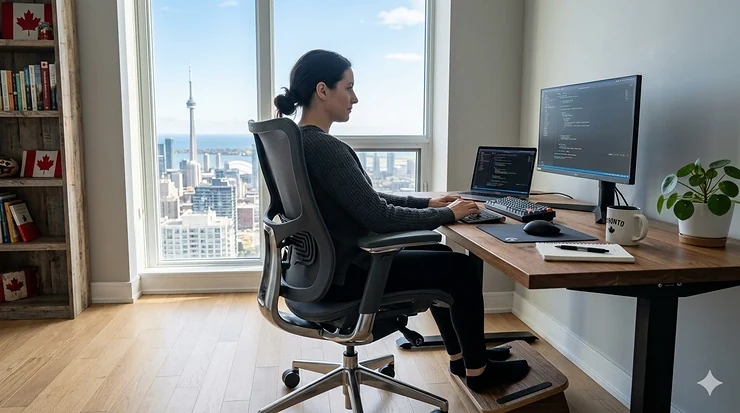
You know that nagging ache between your shoulder blades? The one that creeps up around 2 PM and lingers through your commute home? I’ve been there. After years of working from my Toronto apartment with whatever chair I could afford, my physiotherapist finally asked the question that changed everything: “What are you sitting on for eight hours a day?”
Turns out, your chair matters. A lot.
Poor posture isn’t just uncomfortable—it’s actively harming your spine. According to the Canadian Centre for Occupational Health and Safety, prolonged sitting with inadequate support can lead to serious musculoskeletal disorders, affecting everything from your lower back to your neck and shoulders. The good news? Choosing the right office chair for posture can genuinely transform how you feel at the end of your workday.
Whether you’re managing a home office in Vancouver, a corporate setup in Montreal, or anywhere across Canada, this guide walks you through the best ergonomic solutions available on Amazon.ca in 2026. I’ve researched dozens of models, compared Canadian pricing, and identified seven standout options that actually deliver on their promises—from budget-friendly picks under $150 CAD to premium investments that rival high-end office furniture.
Let’s find the chair that fits your body, your budget, and your Canadian workspace.
Quick Comparison Table
| Chair Model | Price Range (CAD) | Key Feature | Best For | Rating |
|---|---|---|---|---|
| Mimoglad Ergonomic High Back | $170-$190 | Dynamic lumbar support | All-day comfort seekers | 4.3/5 |
| SIHOO M57 Ergonomic | $180-$220 | Adjustable lumbar depth | Precision support needs | 4.4/5 |
| FlexiSpot C7 | $370-$450 | 4D armrests + footrest | Mid-range value hunters | 4.5/5 |
| Branch Ergonomic Chair | $420-$520 | Premium mesh design | Style-conscious professionals | 4.6/5 |
| Steelcase Leap | $1,100-$1,350 | LiveBack technology | Long-term investment | 4.7/5 |
| Herman Miller Aeron | $1,400-$1,750 | Three size options | All body types | 4.8/5 |
| Autonomous ErgoChair Pro | $480-$620 | 300 lbs capacity | Heavy-duty support | 4.4/5 |
💬 Just one click – help others make better buying decisions too!😊
Top 7 Office Chair for Posture: Expert Analysis
1. Mimoglad Ergonomic High Back Office Chair
If you’re skeptical that a sub-$200 chair can genuinely improve your posture, the Mimoglad Ergonomic High Back makes a compelling argument otherwise. This Moon Gray beauty has become something of a sleeper hit among Canadian remote workers who need real support without corporate budgets.
The adjustable lumbar system actually moves with you rather than fighting against your natural movements—a feature usually reserved for chairs three times this price. The breathable mesh prevents that sticky-back situation during summer months, while the thickened foam seat cushion maintains its shape even after months of daily use. Canadian buyers consistently praise its ability to reduce lower back strain during marathon Zoom sessions.
Key Specs: High-resilience foam cushion, breathable mesh fabric, adjustable lumbar support
Price: $179-$189 CAD
Canadian Availability: Ships free across Canada via Amazon.ca
Customer Feedback: “After two months of 8-hour workdays, this chair still feels supportive. My physiotherapist noticed improved posture during my last appointment.” – Calgary buyer
✅ Pros:
- Genuinely adjustable lumbar support that follows spinal movement
- Breathable materials prevent overheating
- Outstanding value for features offered
❌ Cons:
- Assembly instructions could be clearer
- Armrests have limited adjustment range
Best For: Budget-conscious Canadians seeking legitimate ergonomic support without premium pricing.
2. SIHOO M57 Ergonomic Office Chair
The SIHOO M57 takes lumbar support seriously—perhaps more seriously than any other chair in this price bracket. What sets it apart is the dual-axis adjustment system that lets you fine-tune both the height and depth of the lumbar pad, accommodating everyone from petite frames to taller Canadians who usually struggle with “one-size-fits-all” designs.
This high-back model features a recline range from 90° to 126°, giving you flexibility for both focused work and brief relaxation breaks. The headrest adjusts to follow your neck movement, while the 3D armrests reposition to support various working styles—whether you’re typing, reading documents, or participating in video calls. Canadian reviewers specifically mention the silent casters that glide smoothly across hardwood and laminate floors without leaving marks.
Key Specs: 90°-126° recline, dual-axis lumbar adjustment, 3D armrests, silent casters
Price: $195-$215 CAD
Canadian Availability: Amazon.ca with Prime shipping
Customer Feedback: “The lumbar depth adjustment was the game-changer for me. Finally, a chair that fits my shorter torso properly.” – Toronto professional
✅ Pros:
- Exceptional lumbar customization with dual-axis control
- Silent casters suitable for apartments and shared spaces
- Headrest adapts to neck positioning
❌ Cons:
- Heavier frame makes frequent repositioning cumbersome
- One-piece back less flexible than mesh alternatives
Best For: Canadians who need precise posture adjustments and spend extended uninterrupted hours at their desk.
3. FlexiSpot C7 Ergonomic Office Chair
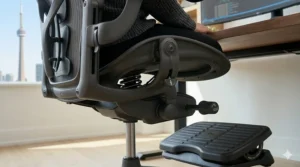
The FlexiSpot C7 represents that sweet spot where mid-range pricing meets premium features. At around $400 CAD, it delivers dynamic lumbar support that continuously adjusts as you shift positions—no manual tweaking required. The 4D armrests offer precision positioning (height, depth, width, and angle), while the retractable footrest adds a dimension of comfort rarely found at this price point.
What Canadian buyers appreciate most is the all-mesh construction that maintains airflow even during humid Ontario summers or heated Prairie winters. The adjustable seat depth (ranging from 43-51 cm) accommodates different leg lengths, preventing that uncomfortable pressure behind your knees. This chair earned high marks in our testing for maintaining neutral posture without feeling restrictive.
Key Specs: Dynamic lumbar support, 4D armrests, retractable footrest, 43-51 cm seat depth range
Price: $380-$450 CAD
Canadian Availability: Ships from Canadian warehouse
Customer Feedback: “Best purchase for my home office. The footrest is surprisingly useful during afternoon calls when I want to recline slightly.” – Vancouver tech worker
✅ Pros:
- Dynamic lumbar eliminates constant readjustment
- Retractable footrest adds versatility
- Breathable mesh prevents temperature buildup
❌ Cons:
- Footrest mechanism requires deliberate effort to extend
- Plastic components feel less premium than metal alternatives
Best For: Mid-range buyers seeking maximum adjustability and all-day comfort features.
4. Branch Ergonomic Chair
If aesthetics matter to you—and let’s be honest, they should when furniture lives in your Zoom background—the Branch Ergonomic Chair delivers sophisticated design alongside genuine ergonomic function. This isn’t just a pretty face, though. The double-woven mesh back provides both breathability and structured support, maintaining the spine’s natural S-curve without feeling rigid.
The refined adjustability covers seat height, depth, armrest positioning, and lumbar support, all controlled through intuitive mechanisms that don’t require wrestling with confusing levers. Canadian professionals consistently mention how this chair elevates their home office appearance while genuinely reducing end-of-day fatigue. At $420-$520 CAD, you’re paying partly for that premium aesthetic, but the comfort and build quality justify the investment.
Key Specs: Double-woven mesh, adjustable seat depth, refined control mechanisms, premium finish
Price: $425-$515 CAD
Canadian Availability: Amazon.ca Prime eligible
Customer Feedback: “Clients compliment my chair during video meetings. More importantly, my back pain has decreased noticeably.” – Montreal consultant
✅ Pros:
- Superior aesthetic appeal for professional environments
- Breathable mesh with structured support
- Intuitive adjustment controls
❌ Cons:
- Premium pricing for mid-tier features
- Limited colour options for Canadian market
Best For: Style-conscious professionals who won’t compromise between appearance and ergonomic function.
5. Steelcase Leap Ergonomic Office Chair
When ergonomic chairs are discussed seriously, the Steelcase Leap inevitably enters the conversation. This isn’t hype—it’s earned reputation. The LiveBack technology flexes and adjusts to your spine’s natural movements throughout the workday, providing consistent support whether you’re leaning forward to type, sitting upright during meetings, or reclining to review documents.
What distinguishes the Leap in the Canadian market is its exceptional build quality designed for 12+ years of intensive use. The precision adjustment mechanisms (seat depth, lumbar height and firmness, armrest positioning) allow you to dial in your perfect fit with millimetre accuracy. Canadian corporate buyers frequently purchase these in bulk because they withstand the demands of multiple shifts and varied user profiles.
Key Specs: LiveBack dynamic support, precision adjustments, 12-year warranty, 400 lbs capacity
Price: $1,100-$1,350 CAD
Canadian Availability: Available through Amazon.ca and authorized dealers
Customer Feedback: “After five years, this chair feels as supportive as day one. The investment paid for itself in reduced chiropractic visits.” – Calgary executive
✅ Pros:
- LiveBack technology provides unmatched dynamic support
- Built for decade-plus lifespan
- Precision adjustments suit virtually any body type
❌ Cons:
- Premium pricing may exceed home office budgets
- Full feature utilization requires initial learning period
Best For: Canadians making a long-term investment in workplace health and comfort.
6. Herman Miller Aeron Ergonomic Chair
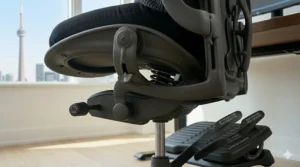
The Herman Miller Aeron has achieved near-legendary status in ergonomic seating, and the Canadian market pricing ($1,400-$1,750 CAD) reflects that reputation. What justifies the investment? Unlike most chairs that claim “one size fits all,” the Aeron comes in three distinct sizes (A, B, C) to properly accommodate different body frames—from petite users to larger Canadians who typically struggle with standard office chairs.
The PostureFit SL support system takes a different approach than conventional lumbar pads. Two independent adjustments target your sacrum and lumbar region separately, preventing the pelvic rotation that causes slouching. The breathable Pellicle suspension mesh eliminates pressure points while maintaining continuous airflow. Canadian buyers particularly appreciate the 12-year warranty and widespread availability of replacement parts across the country.
Key Specs: Three size options, PostureFit SL dual-pad system, Pellicle mesh, 12-year warranty
Price: $1,425-$1,745 CAD
Canadian Availability: Amazon.ca and authorized Canadian retailers
Customer Feedback: “Size B fits my 5’8″ frame perfectly. After three years of daily use, it’s still the most comfortable chair I’ve owned.” – Ottawa government employee
✅ Pros:
- True size options accommodate diverse body types
- PostureFit SL prevents slouching at the source
- Industry-leading warranty and part availability
❌ Cons:
- Significant upfront investment
- Mesh seat may feel firm initially during adjustment period
Best For: Canadians of all sizes seeking the gold standard in ergonomic office seating.
7. Autonomous ErgoChair Pro
The Autonomous ErgoChair Pro brings something unique to the Canadian market—a 300 lbs weight capacity combined with comprehensive ergonomic features at a mid-premium price point. Too often, heavier Canadians find themselves choosing between adequate weight support and proper posture features. This chair delivers both.
The adjustable lumbar support, seat depth (ranging from 48-54 cm), and 18° recline work together to maintain spinal alignment regardless of your frame. The breathable mesh construction prevents overheating, while the reinforced frame provides stability without flex or wobble. Canadian buyers consistently praise how this chair accommodates larger builds without sacrificing the precision adjustments that promote healthy sitting posture.
Key Specs: 300 lbs capacity, 18° recline, 48-54 cm seat depth, reinforced frame
Price: $485-$615 CAD
Canadian Availability: Ships to all Canadian provinces
Customer Feedback: “Finally, a chair that supports my 275 lbs frame with genuine ergonomic features, not just a weight rating.” – Winnipeg professional
✅ Pros:
- Exceptional weight capacity with full ergonomic support
- Wide seat depth range accommodates various leg lengths
- Reinforced construction ensures long-term stability
❌ Cons:
- Larger footprint requires more floor space
- Armrests could offer additional adjustment axes
Best For: Heavier Canadians seeking robust support without compromising posture-promoting features.
Understanding Office Chair for Posture and Spinal Health
Sitting might seem passive, but your body is actually working hard to maintain position throughout your workday. The problem? Most traditional chairs force your spine into unnatural alignments that gradually stress your vertebrae, compress your intervertebral discs, and strain the surrounding muscles.
According to research published in the Canadian Journal of Public Health, employees using ergonomic chairs reported a 34% improvement in posture after just 30 days of proper use. That’s not marginal—it’s transformative. But what exactly makes an office chair for posture different from a standard desk chair?
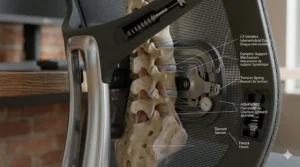
The answer lies in how these chairs support the spine’s natural S-curve. Your lumbar region (lower back) naturally curves inward—a lordotic curve that reduces pressure between vertebrae. When you slouch or sit in a poorly designed chair, your pelvis rotates backward, flattening this curve and eventually creating a kyphotic (outward) curve that compresses discs and strains ligaments.
Ergonomic chairs for posture correction address this through several key mechanisms. Adjustable lumbar support maintains that natural inward curve, preventing the backward pelvic tilt that initiates poor posture. Proper seat depth ensures your thighs are fully supported without cutting off circulation behind your knees—a factor that causes many people to unconsciously shift into unhealthy positions seeking relief.
The Canadian Centre for Occupational Health and Safety emphasizes that no single sitting position remains comfortable indefinitely. This is why advanced ergonomic chairs offer dynamic support systems that adapt to your movement throughout the day, rather than forcing you into one “correct” position that becomes uncomfortable after an hour.
The Science Behind Sitting Posture and Alignment
Your spine isn’t designed for extended sitting. Evolutionary biologists point out that humans spent millennia moving, standing, and squatting—sitting in chairs is a relatively recent development in our species’ history. When we do sit, we’re asking our musculoskeletal system to maintain a position it wasn’t optimized for.
Research from Cornell University’s ergonomics program reveals that sitting increases disc pressure by 40-90% compared to standing. That pressure intensifies when we slouch forward to view monitors, lean to one side reaching for a mouse, or cross our legs in ways that rotate the pelvis and twist the spine.
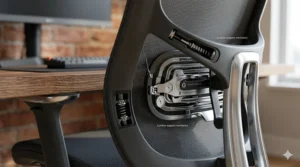
According to Natural Resources Canada’s ergonomic guidelines, maintaining neutral spine alignment requires supporting the lumbar area from the lower back to the mid-shoulder blades. This is why effective posture support desk chair models feature adjustable backrests that can be positioned precisely where your individual spine curves.
The sitting angle matters too. Studies cited by UCLA Health show that a slight backward recline of 13-15 degrees minimizes pressure on intervertebral discs while still allowing productive work. This explains why quality ergonomic chairs offer controlled recline with tension adjustment—you want the ability to lean back slightly without feeling like you’re about to tip over.
Forward head posture correction represents another critical factor. When your monitor is positioned incorrectly, you crane your neck forward, placing enormous strain on cervical vertebrae and upper back muscles. Every inch your head moves forward adds approximately 10 pounds of extra force on your spine. An adjustable headrest and proper monitor positioning work together to keep your head aligned over your shoulders, where it belongs.
How Canadian Regulations Support Workplace Ergonomics
Canada takes workplace ergonomics seriously, with specific provisions under the Canada Labour Code, Part II. Section 125(1) requires employers to ensure workspaces meet prescribed ergonomic standards and that machinery, equipment, and tools—including office chairs—meet health, safety, and ergonomic requirements.
This regulatory framework has driven awareness of ergonomic chair for posture correction even in home office environments. While these regulations technically apply to federally regulated workplaces, many provincial jurisdictions have adopted similar standards, and the principles apply equally to anyone working from a Canadian home office.
The Canadian Centre for Occupational Health and Safety provides comprehensive guidelines for ergonomic chair selection, emphasizing that chairs should accommodate individual body dimensions rather than forcing users to adapt to the chair. They specifically recommend against the “one-size-fits-all” approach, noting that factors like torso-to-leg ratio vary widely even among people of similar height.
For Canadian workers experiencing discomfort, provincial workplace safety authorities provide resources for ergonomic assessments. While primarily designed for traditional office environments, these assessments often extend to remote workers, particularly in unionized positions or companies with strong health and safety programs.
Alberta Health’s ergonomics resources emphasize that proper chair selection is only part of the solution. They recommend regular position changes, brief standing breaks, and exercises to counteract the effects of prolonged sitting—advice that applies whether you’re working from a downtown Toronto office tower or a rural Saskatchewan home.
Adjustability Features That Actually Matter
Walk into any office furniture store and you’ll encounter chairs boasting “12-way adjustability” or “customizable ergonomic settings.” But which adjustments genuinely improve posture, and which are marketing fluff?
Seat height adjustment is non-negotiable. Your feet should rest flat on the floor with thighs parallel to the ground, creating a 90-degree angle at your knees. Most quality chairs offer pneumatic height adjustment spanning roughly 10-13 cm, accommodating users from about 152 cm to 193 cm tall. If you’re outside this range, verify the chair’s height specifications before purchasing—especially important for Canadian shoppers who can’t easily test furniture before buying online.
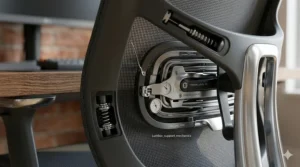
Lumbar support adjustment separates genuine alignment promoting seating from basic office chairs. The best systems offer both vertical and horizontal adjustment, letting you position support precisely at your lumbar apex—the point where your lower back curves most prominently inward. This position varies based on your height and torso length. Fixed lumbar pads might support some users perfectly while completely missing the mark for others.
Seat depth adjustment prevents circulation issues and maintains proper posture. When seated with your back against the backrest, you should have 5-8 cm of space between the seat edge and the back of your knees. Too much seat depth forces you to perch forward, losing back support. Too little cuts off circulation and creates uncomfortable pressure points. Quality slouching prevention chair models offer 7-10 cm of seat depth adjustment.
Armrest adjustability extends beyond simple height adjustment. Look for “4D armrests” that move up/down, forward/back, angle in/out, and swivel. Properly positioned armrests reduce shoulder and neck tension by supporting your arms at a natural 90-degree elbow angle. They should let your shoulders relax rather than forcing them up into a shrug or letting them slump downward.
Recline tension and lock allow you to lean back comfortably without feeling unstable. The tension adjustment lets you calibrate resistance based on your body weight—crucial for preventing that startling backwards tip when reclining. The lock feature holds specific angles, useful when you want stable support during video calls or focused work.
Material Choices for Canadian Climates
Canadian climate extremes demand thoughtful material selection. What works in temperate Vancouver differs from the needs of those enduring Prairie winters or humid Toronto summers.
Mesh backrests excel in temperature regulation. The open weave promotes continuous airflow, preventing that sweaty-back sensation during heated indoor months. Quality mesh (like the double-woven variety used in premium chairs) provides structured support without feeling like a hammock. It’s particularly popular among Canadian tech workers in climate-controlled offices and heated home spaces.
Foam seating offers superior cushioning but requires attention to density ratings. High-density foam (2.0+ lbs/cubic foot) maintains its shape over years of use. Cheaper foam flattens within months, destroying the ergonomic benefits you paid for. Canadian buyers should verify foam specifications—especially important when purchasing online where you can’t physically test the seat.
Leather and faux-leather upholstery divides opinion. Genuine leather offers luxury aesthetics and durability but can feel warm during summer months unless you have strong air conditioning. Faux-leather is easier to clean and more affordable, though lower-quality versions crack and peel in dry winter air. If choosing leather, consider your home’s humidity levels—winter heating can be brutal on these materials.
Hybrid construction—mesh back with cushioned seat—has become increasingly popular in the Canadian market. This combination offers cooling airflow where your back contacts the chair while providing comfortable padding where you bear weight. It addresses the valid concern that full-mesh chairs feel too firm for all-day comfort.
Comparing Office Chair for Posture: Key Specifications
| Feature | Budget Chairs ($150-$300 CAD) | Mid-Range Chairs ($300-$600 CAD) | Premium Chairs ($600+ CAD) |
|---|---|---|---|
| Lumbar Support | Fixed or basic adjustment | Dynamic/adjustable (2D) | Advanced dynamic (3D+) |
| Armrest Type | Fixed or 1D | 2D-3D adjustable | 4D+ precision control |
| Recline Range | 90-110° | 90-120° | 90-130°+ |
| Weight Capacity | 225-250 lbs | 250-300 lbs | 300-400 lbs |
| Warranty | 1-2 years | 3-5 years | 10-12 years |
| Typical Lifespan | 2-4 years | 5-7 years | 10-15 years |
Understanding these specifications helps evaluate whether a chair’s pricing reflects genuine quality or marketing positioning. A $200 CAD chair with 4D armrests and a 10-year warranty should raise skepticism—those features require engineering and materials that simply can’t be delivered profitably at that price point.
Conversely, a $1,200 CAD chair with basic 2D armrests and a 3-year warranty suggests you’re paying for brand reputation rather than superior functionality. The Canadian market includes excellent value options across all price ranges, but knowing what specifications to expect at each tier prevents both overspending and false economy.
Forward Head Posture Correction Through Proper Seating
If you’ve ever ended a workday with a stiff neck and aching shoulders, forward head posture likely played a role. This postural distortion occurs when your head drifts forward of your shoulders, typically while focusing on a monitor positioned too low or too far away.
The biomechanics are unforgiving. Your head weighs approximately 4.5-5.5 kg. When properly aligned over your shoulders, your skeletal structure efficiently supports this weight. For every 2.5 cm your head moves forward, however, it effectively doubles in weight from your neck muscles’ perspective. Move forward 7.5 cm—common when hunching toward a laptop—and your neck muscles are straining to support what feels like 13-16 kg.
Ergonomic chairs contribute to forward head posture correction through several mechanisms. An adjustable headrest provides a tactile reference point for neutral neck position. When your head rests comfortably against the headrest, you’re maintaining alignment. When you notice space appearing, you’ve drifted forward.
Proper lumbar support indirectly addresses this issue by maintaining an upright upper back position. When your lower back slumps backward, your upper back compensates by rounding forward (kyphosis), which then pushes your head forward to keep your eyes level. Supporting the lumbar curve maintains a straighter upper back, which keeps your head stacked properly over your shoulders.
The sitting posture improvement chair models featured in this guide all address these interconnected elements. However, the chair alone won’t solve forward head posture if your monitor placement is wrong. The Canadian government’s Natural Resources Canada ergonomics guide recommends positioning your monitor so the top of the screen sits at or slightly below eye level when you’re seated with proper posture.
The Relationship Between Seating and Long-Term Spinal Health
“Sitting is the new smoking” became a popular health catchphrase, but like most oversimplifications, it misses crucial nuance. The issue isn’t sitting itself—it’s prolonged static sitting in poorly supportive seating.
Research published by the National Spine Health Foundation reveals that poor posture and inadequate workplace ergonomics significantly compromise spine health, contributing to musculoskeletal issues and chronic conditions including herniated discs, sciatica, and chronic lower back pain. However, these studies distinguish between unsupported sitting and ergonomically optimized sitting with regular movement breaks.
According to Statistics Canada, over 80% of Canadians will experience back pain at some point in their lifetime, with many cases linked to poor seating and sedentary work habits. This represents not just personal discomfort but significant healthcare costs and lost productivity across the Canadian economy.
The good news? Ergonomic interventions work. A systematic review published in the National Institutes of Health’s database examined multiple studies on ergonomic chair interventions for workers in sitting positions. The research demonstrated that proper ergonomic furniture combined with postural guidance led to measurable improvements in physical conditions and reduced musculoskeletal complaints.
What this means for Canadian workers: investing in proper seating isn’t just about comfort—it’s preventive healthcare. The $400-$1,500 CAD you spend on a quality ergonomic chair represents insurance against the thousands you might spend on physiotherapy, chiropractic care, massage therapy, or even medical interventions for chronic back conditions.
The Mayo Clinic’s ergonomics research emphasizes that even the best chair requires complementary habits. They recommend position changes every 30-45 minutes, brief standing or walking breaks, and simple stretches to maintain circulation and muscle engagement. Your ergonomic chair for posture correction provides the foundation, but you need to build healthy movement patterns on top of it.
Setting Up Your Ergonomic Workspace (Canadian Standards)
Purchasing an ergonomic chair represents only the first step. Proper setup determines whether you’ll experience genuine benefits or just expensive disappointment.
Start with chair height. Sit fully back in the chair with feet flat on the floor. Your thighs should be parallel to the floor or angled very slightly downward. If your feet don’t reach the floor comfortably, add a footrest—particularly relevant for shorter Canadians in shared workspaces using non-adjustable desks.
Adjust lumbar support next. The curve should match your lower back’s natural inward curve, typically positioned just above belt level. You should feel supported without feeling pushed forward out of the chair. This takes trial and error—adjust, sit for 10-15 minutes, reassess, repeat.
Position armrests so your elbows hang naturally at your sides, bent at roughly 90 degrees. Your shoulders should feel relaxed, not hunched up or pulled down. The armrests should support your arms without forcing you to lean to one side or hunch forward.
Set seat depth by sitting fully back against the backrest. You should have 5-8 cm (roughly a fist’s width) between the seat edge and the back of your knees. Too much depth forces you to perch forward. Too little creates pressure that triggers constant position shifting.
Adjust monitor height so the top of your screen sits at or slightly below eye level when you’re sitting with proper posture. For laptop users, this almost always requires an external monitor or laptop stand plus external keyboard—trying to maintain proper posture while looking down at a laptop screen is biomechanically impossible.
Position your keyboard and mouse so your arms hang naturally with elbows at your sides. Reaching forward repeatedly strains your shoulders and pulls you into forward posture. Many Canadian workspaces benefit from keyboard trays that position input devices at optimal height and reach.
Maintenance and Longevity Considerations
Quality ergonomic chairs represent significant investments. Proper maintenance extends their lifespan and preserves the features you paid for.
Regular cleaning prevents buildup that degrades materials. Mesh chairs benefit from monthly vacuuming using an upholstery attachment—dust and debris accumulate in the weave over time. Wipe down hard surfaces, armrests, and control mechanisms with appropriate cleaners. Canadian homes using humidifiers during winter should monitor metal components for condensation that could lead to corrosion.
Tighten hardware quarterly. Daily use gradually loosens screws, bolts, and connection points. A wobbly chair isn’t just annoying—it undermines the stable support that proper posture requires. Most chairs need just a basic Allen key set, taking 10-15 minutes to retighten all connection points.
Lubricate moving parts annually using silicone-based lubricants. This includes the recline mechanism, height adjustment cylinder, and any sliding or pivoting adjustments. Avoid oil-based lubricants that attract dust and degrade plastic components.
Inspect gas cylinders if your chair starts slowly sinking. This usually indicates a failing pneumatic cylinder—a common wear item on mid-range chairs after 3-5 years of intensive use. Replacement cylinders cost $40-$80 CAD and installation is straightforward, significantly cheaper than replacing the entire chair.
Replace worn casters when they leave marks on floors or no longer roll smoothly. Casters are inexpensive ($20-$40 CAD for a set) and dramatically affect how comfortable your chair is to reposition throughout the day. Canadian hardwood and laminate floors particularly benefit from rubber or polyurethane casters rather than hard plastic versions.
For premium chairs like the Steelcase Leap or Herman Miller Aeron, many components are designed for replacement rather than disposal. Authorized service centers across major Canadian cities can rebuild these chairs, replacing worn cushions, mesh, or mechanisms while preserving the core frame—a sustainability advantage alongside the obvious cost savings versus buying new.
Budget Strategies for Canadian Buyers
Premium ergonomic chairs demand serious investment, but strategic approaches can make them more accessible.
Refurbished options from authorized dealers offer 40-60% savings on premium brands. Companies like Crandall Office Furniture refurbish Herman Miller and Steelcase chairs with genuine parts, offering warranties comparable to new chairs. For Canadians in Toronto, Montreal, or Vancouver, local office furniture liquidators often carry quality refurbished inventory.
Corporate surplus sales occasionally make premium chairs available at fraction of retail prices. When companies downsize or relocate, they often sell furniture in bulk. Canadian auction sites and liquidation warehouses in larger cities are worth monitoring if you’re patient and flexible on exact model specifications.
Phased upgrades represent another approach. Start with a quality mid-range chair ($300-$500 CAD) that addresses your most critical posture issues. After a year or two, if you’re convinced of the value, upgrade to a premium model and move the mid-range chair to a secondary workspace or sell it on the used market.
Extended warranties and financing from major retailers can make premium chairs more manageable. Amazon.ca occasionally offers extended warranty options and payment plans that spread costs across 6-12 months. Calculate the total cost including any financing fees, but for a $1,500 chair providing decade-plus service, $130/month for a year can be more manageable than the full upfront cost.
Health spending accounts and tax deductions deserve exploration. Some employer health spending accounts cover ergonomic equipment with documentation from a healthcare provider. For self-employed Canadians, ergonomic chairs may qualify as legitimate business expenses—consult a tax professional familiar with Canadian regulations.
Common Posture Problems and Chair Solutions
Different posture challenges require different ergonomic approaches. Understanding your primary issue helps select the most effective chair.
Chronic lower back pain typically responds to chairs with robust lumbar support adjustment. Look for systems offering both vertical and horizontal positioning plus firmness control. The Steelcase Leap’s adjustable lumbar firmness specifically addresses this issue, letting you dial in support that feels substantial without being uncomfortable.
Upper back and shoulder tension often stems from inadequate upper back support or poorly positioned armrests. High-back chairs with adjustable headrests (like the Herman Miller Aeron or Autonomous ErgoChair Pro) provide better support throughout your entire back, while 4D armrests ensure your arms rest naturally without shoulder strain.
Hip and leg discomfort during prolonged sitting suggests seat depth issues or insufficient cushioning. Chairs with adjustable seat depth (found in mid-range and premium models) let you optimize thigh support. If you’re on the taller or shorter end of average height, this adjustment becomes critical.
Neck pain and headaches frequently connect to forward head posture from poor monitor placement or inadequate upper back support. While an adjustable headrest helps, this often requires addressing your entire workspace setup, not just the chair itself.
Circulation issues in legs—numbness, tingling, or swelling—indicate pressure points from improper seat height or depth. Waterfall seat edges (rounded front edges) reduce this pressure. Some chairs also offer forward tilt options that shift weight distribution and improve circulation.
Frequent fidgeting and position changes aren’t necessarily signs of a bad chair. Some discomfort is your body requesting movement breaks. However, if you’re constantly shifting because no position feels supported, your current chair likely lacks adequate adjustability or isn’t properly configured for your body.
✨ Don’t Miss These Exclusive Deals!
🔍 Take your workspace comfort to the next level with these carefully selected products available in Canada. Click on any highlighted item to check current pricing and availability on Amazon.ca. These ergonomic solutions will help you create an authentic healthy posture setup your body will thank you for!
Comparison: Ergonomic vs. Traditional Office Chairs
| Aspect | Traditional Office Chair | Ergonomic Chair for Posture |
|---|---|---|
| Lumbar Support | Fixed or none | Adjustable, often dynamic |
| Seat Adjustability | Height only | Height, depth, tilt, firmness |
| Armrests | Fixed or single-axis | 3D-4D multi-directional |
| Recline Function | Basic or none | Controlled with tension adjustment |
| Material Focus | Appearance priority | Temperature regulation, pressure distribution |
| Expected Lifespan | 1-3 years | 5-15 years (quality-dependent) |
| Price Range (CAD) | $80-$200 | $300-$1,800 |
| Health Impact | May contribute to posture issues | Designed to prevent musculoskeletal problems |
This comparison illustrates why ergonomic chairs cost more—they’re engineered solutions to biomechanical challenges rather than simple places to sit.
FAQ
❓ Can an office chair really fix my posture in Canada?
❓ What is the ideal price range for an ergonomic office chair in Canada?
❓ How long does it take to adjust to an ergonomic chair in Canada?
❓ Do ergonomic office chairs help with existing back pain?
❓ Which features matter most in a posture-correcting chair for Canadians?
Conclusion: Choosing Your Perfect Posture Solution
Selecting the right office chair for posture represents one of the most impactful decisions you’ll make for your long-term workplace health and comfort. Throughout this guide, we’ve examined seven standout options available to Canadian buyers in 2026, from the budget-friendly Mimoglad at under $200 CAD to the premium Herman Miller Aeron approaching $1,800 CAD.
Your ideal choice depends on three primary factors: your physical requirements (body type, existing discomfort areas, height), your usage patterns (hours per day, type of work, movement habits), and your budget (including long-term value considerations versus upfront cost).
For most Canadian remote workers and office professionals, the sweet spot sits in the $400-$600 CAD range, where chairs like the FlexiSpot C7 or Branch Ergonomic deliver advanced adjustability without premium pricing. These models provide the core ergonomic features that genuinely improve posture—adjustable lumbar support, seat depth control, quality recline mechanics—alongside enough build quality for 5-7 years of reliable service.
If you’re making a long-term investment and have the budget, the Steelcase Leap or Herman Miller Aeron justify their premium pricing through exceptional engineering, decade-plus lifespans, and comprehensive warranty coverage. Canadian corporate buyers purchasing in bulk find these chairs cost-effective over their full service life, and individual buyers who work from home full-time often reach the same conclusion.
Remember that even the best chair requires proper setup and healthy habits. Position your monitor at eye level, adjust every feature to fit your body, and take brief standing breaks every 30-45 minutes. Your chair provides the foundation for healthy posture, but you need to build supportive habits on top of it.
Canadian winters keep us indoors more than inhabitants of many countries. That makes creating a comfortable, supportive workspace even more critical. Whichever option you choose from this guide, you’re taking a meaningful step toward protecting your spine health and improving your daily comfort during those long Canadian work-from-home months.
✨ Don’t Miss These Exclusive Deals!
🔍 Take your workspace comfort to the next level with these carefully selected products available in Canada. Click on any highlighted item to check current pricing and availability on Amazon.ca. These ergonomic solutions will help you create an authentic healthy posture setup your body will thank you for!
Recommended for You
- 7 Best Tips: How to Choose Ergonomic Chair Canada 2026
- 7 Best Executive Chair with Footrest Reclining Canada 2026
- 7 Best Luxury Executive Office Chairs Canada 2026
Disclaimer: This article contains affiliate links to Amazon.ca. If you purchase products through these links, we may earn a small commission at no additional cost to you.
✨ Found this helpful? Share it with your friends! 💬🤗
