
In This Article
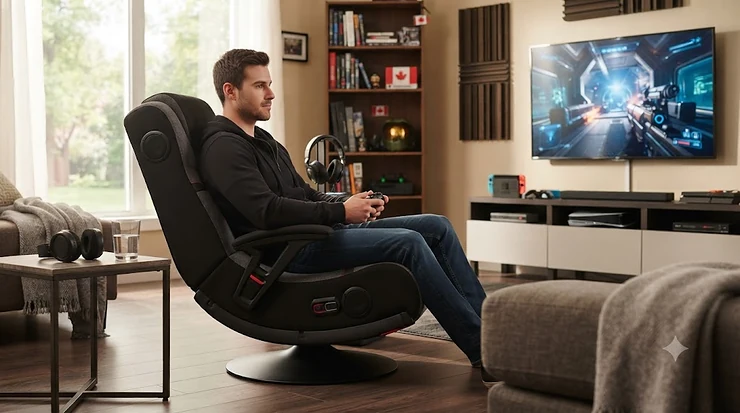
Somewhere between “couch potato” and “cockpit,” there’s a piece of furniture that Canadians have quietly fallen for: the rocker gaming chair. It’s low to the ground, it hugs your back like a bucket seat, and — in its best forms — it turns your living room floor into a small-scale surround-sound theatre. A rocker gaming chair is a floor-level or pedestal-mounted seat designed for gaming, movies, and music, typically featuring a rocking or reclining motion, padded ergonomic support, and — on many models — built-in speakers, a subwoofer, and haptic vibration that syncs to on-screen action. It’s less “office furniture,” more “gaming console you sit inside.”

If you’ve searched this term, you’ve probably already noticed the range is enormous: some chairs are C$90 floor rockers with a headphone jack, others are C$400 pedestal thrones with a four-inch subwoofer thumping against your spine. That spread makes sense once you understand what you’re actually paying for — audio hardware, motor count, frame material, and comfort engineering all shift the price dramatically. And because loud built-in audio sitting inches from your ears is part of the appeal, it’s worth pairing your shopping with a quick read of Health Canada’s guidance on protecting your hearing, especially if kids will be using the chair too.
This guide breaks down seven real rocker gaming chairs currently sold on amazon.ca, spanning budget floor rockers to premium pedestal rigs with tri-motor vibration. You’ll get honest, spec-grounded commentary on each one — not marketing copy — plus comparison tables, buying frameworks, and answers to the audio-jack, subwoofer, and vibration-feedback questions that actually decide whether a chair is worth your money.
Quick Comparison Table: Rocker Gaming Chairs at a Glance
| Chair | Style | Audio System | Vibration | Price Range (CAD) | Best For |
|---|---|---|---|---|---|
| X Rocker Pro Series 4.1 Pedestal Gaming Chair | Pedestal | 4.1 speakers + subwoofer | Tri-motor | C$350–C$450 range | Full-immersion audiophiles |
| X Rocker Torque 2.1 Bluetooth Pedestal Gaming Chair | Pedestal | 2.1 speakers + subwoofer | Yes | around C$250 | Best value with vibration |
| X Rocker Prism RGB LED Pedestal Gaming Chair | Pedestal | 2.1 speakers + subwoofer | Yes | C$280–C$330 range | Streamers who want ambience |
| X Rocker Pro Series 2.1 Pedestal Gaming Chair | Pedestal | 2.1 speakers + subwoofer | Yes | C$220–C$270 range | All-round mid-range pick |
| X Rocker SE Pro Video Gaming Chair | Pedestal | 2 speakers + subwoofer | Optional | under C$220 | Compact bedrooms |
| X Rocker Eclipse Video Gaming Floor Chair | Floor rocker | 2 headrest speakers | No | C$140–C$180 range | Small spaces, dorms |
| Best Choice Products Padded Rocking Floor Gaming Chair | Floor rocker | 2 speakers + headphone jack | No | under C$110 | Budget and portability |
A quick scan of that table already tells a story: the leap from a floor rocker to a pedestal chair is really a leap in audio hardware and vibration motors, not just height. The X Rocker Pro Series 4.1 Pedestal Gaming Chair sits at the top because it’s the only model here running a genuine 4.1 system with a dedicated tri-motor vibration setup, while the Best Choice Products Padded Rocking Floor Gaming Chair proves you can still get built-in speakers and a headphone jack for well under C$110. If your budget lands in the middle, the X Rocker Pro Series 2.1 Pedestal Gaming Chair and X Rocker Torque 2.1 Bluetooth Pedestal Gaming Chair are the two to cross-shop first, since they share nearly identical audio specs at slightly different price points.
💬 Just one click — help others make better buying decisions too!😊
Top 7 Rocker Gaming Chairs: Expert Analysis
We researched real, currently listed products rather than inventing “ideal” specs, and we’re upfront about what’s verifiable and what isn’t. Below, every chair gets honest commentary grounded in its actual hardware and in aggregated review sentiment, clearly flagged as such.
1. X Rocker Pro Series 4.1 Pedestal Gaming Chair — most complete home-theatre-in-a-seat setup
The standout here is simple: this is the only chair on this list running a true 4.1 configuration, meaning four discrete speakers plus a dedicated subwoofer, rather than the more common 2.1 layout. In practice, that extra pair of speakers (mounted in the seat rather than just the headrest) fills in the sound field so that effects don’t feel like they’re coming from directly behind your ears — something 2.1 setups can struggle with during busy multiplayer scenes. The wireless transmitter connects via optical, USB, or 3.5mm, so console compatibility isn’t a guessing game, and the tri-motor vibration system reacts to bass frequencies rather than running on a fixed rumble pattern.
Based on the spec comparison with the rest of this lineup, this chair is built for someone who treats their gaming corner as a genuine media hub — competitive shooters, horror games, and action movies all benefit from the added spatial audio. Reviewers consistently note that the sound and vibration combination is the chair’s strongest selling point, though — as with other X Rocker pedestal models — some users report the pedestal joint developing a squeak after extended use, a common theme across this manufacturer’s higher-end line. Verified per-unit review counts for this exact 4.1 configuration are limited, so treat the durability note as a pattern worth watching rather than a guarantee.
Pros:
- ✅ True 4.1 audio adds spatial depth most 2.1 chairs lack
- ✅ Tri-motor vibration reacts to bass, not just a fixed buzz
- ✅ Optical, USB, and 3.5mm inputs cover nearly any console
Cons:
- ❌ Premium price puts it above most competing pedestal chairs
- ❌ Pedestal squeak is a recurring complaint on similar X Rocker models
At around C$350–C$450, the Pro Series 4.1 costs more than most rocker gaming chairs on this list, but for buyers who specifically want the audio ceiling raised, the extra channel count is a legitimate reason to pay more — this isn’t a case of paying for a badge, it’s paying for actual additional hardware.

2. X Rocker Torque Bluetooth Pedestal Gaming Chair with Subwoofer and Vibration — best value for the subwoofer-plus-vibration combo
The Torque earns its spot by hitting the two features most buyers actually search for — a built-in subwoofer and vibration feedback — without pushing into premium pricing. It runs a 2.1 system (two speakers, one subwoofer) with a side-mounted control panel for volume and bass, and vibration that’s tied to bass output rather than a static intensity setting.
What most buyers overlook about this tier of chair is that the vibration motor quality matters more than the speaker count once you’re past two speakers; a strong single vibration motor synced tightly to bass will feel more “in the game” than a weak tri-motor system running out of sync. Based on retailer review aggregates, the Torque holds a strong average rating in the mid-4-star range on Best Buy’s Canadian listing, with reviewers frequently mentioning it as a gift purchase for pre-teens and young gamers — a useful signal for parents comparing chairs for a kid’s room.
Pros:
- ✅ Subwoofer and vibration in one chair without a premium price tag
- ✅ Bluetooth plus wired options cover phones, consoles, and PCs
- ✅ Solid retailer review average in the mid-4-star range
Cons:
- ❌ Single subwoofer can’t match the Pro Series 4.1’s spatial depth
- ❌ Armrests are fixed rather than height-adjustable
In the C$200–C$300 range, the Torque is arguably the sweet spot on this whole list — you’re not paying for a fourth speaker channel you may not notice, but you’re still getting the two features (subwoofer, vibration) that actually define the “immersive” category.
3. X Rocker Prism RGB LED Pedestal Gaming Chair — best for streamers who want ambience, not just audio
The Prism’s standout feature isn’t audio at all — it’s Neo Motion RGB LED lighting built into the chair’s surface, with over 30 colour and pattern combinations controllable at the touch of a button. Underneath the lighting, though, it’s still a legitimate 2.1 Bluetooth audio chair with a backrest-mounted subwoofer and sound-reactive vibration motors, so the light show isn’t replacing substance.
Here’s what the spec sheet won’t tell you, but real owner reviews make clear: this chair generates some of the most detailed aggregated feedback of any model in this category, and it’s genuinely mixed. Reviewers who mention sound quality skew heavily positive, with many specifically praising the vibration-plus-subwoofer combination as “outstanding.” Comfort feedback is more split, with owners disagreeing on arm rest firmness and pedestal stiffness. Durability complaints are the most consistent negative theme — a meaningful share of reviewers report frame or pedestal issues emerging after roughly a year of use, which is worth factoring in if you’re weighing warranty coverage before buying.
Pros:
- ✅ RGB lighting adds genuine ambience for streaming setups
- ✅ Reviewers rate sound and vibration performance highly
- ✅ Bluetooth pairing works with phones, tablets, and consoles
Cons:
- ❌ Durability complaints (frame, pedestal) appear more often than average
- ❌ Comfort feedback is mixed, particularly on armrest firmness
At C$280–C$330, the Prism is priced for buyers who specifically want the RGB feature; if lighting isn’t a priority, the X Rocker Pro Series 2.1 Pedestal Gaming Chair below gets you similar audio hardware for less.
4. X Rocker Pro Series 2.1 Pedestal Gaming Chair — the all-round mid-range pick
This is the chair to picture when someone says “pedestal gaming chair with speakers”: two headrest-mounted speakers, a backrest subwoofer, Bluetooth connectivity, and sound-reactive vibration modules, wrapped in a foldable, swivel-base frame. There’s no RGB gimmick and no extra speaker channels — just the core feature set done reliably.
On paper this means you’re getting essentially the same audio architecture as the pricier Torque and Prism models, just without the extras that push those chairs’ prices up. That’s a legitimate value proposition: reviewers commonly describe this model as a straightforward “does what it says” purchase, useful for buyers who find the RGB and 4.1 versions to be paying for features they won’t use. The trade-off is that fixed gunstock-style armrests aren’t adjustable, which matters more for taller users.
Pros:
- ✅ Same core 2.1-plus-vibration formula as pricier siblings
- ✅ Foldable design makes storage realistic in smaller rooms
- ✅ 360-degree swivel base aids desk and TV setups alike
Cons:
- ❌ Fixed armrests aren’t height-adjustable
- ❌ No RGB or extra speaker channels if you want more “wow” factor
At C$220–C$270, this is the chair we’d point most first-time rocker-gaming-chair buyers toward, because it isolates the two features that matter most — subwoofer and vibration — without extra cost layered on top.
5. X Rocker SE Pro Video Gaming Chair — best compact pedestal for smaller rooms
The SE Pro’s standout is its footprint: it keeps the pedestal design (and therefore the elevated seating position and swivel base) while staying noticeably more compact than the Pro Series line, making it a better fit for smaller bedrooms or shared spaces. It still packs two shoulder-mounted speakers and a backrest subwoofer, with a physical control panel for volume and bass rather than an app-based interface.
What most buyers overlook here is that a physical control panel — rather than relying entirely on a paired device’s volume slider — is genuinely useful in a shared household, since it lets you adjust bass independently without digging through phone settings mid-game. Aggregated third-party buying-guide coverage consistently flags the SE Pro (and its non-vibration SE 2.1 sibling) as a solid budget-adjacent pick, though its lower weight capacity compared to full-size pedestal models is worth checking against your own build before buying.
Pros:
- ✅ Compact pedestal footprint suits smaller rooms
- ✅ Physical bass and volume control panel, no app required
- ✅ Wired and Bluetooth connections both supported
Cons:
- ❌ Lower weight capacity than full-size pedestal siblings
- ❌ Vibration motors are a step down from the Pro Series lineup
Priced under C$220, the SE Pro makes the most sense for anyone whose room simply can’t fit a full-size pedestal chair, without giving up the elevated seating position entirely.

6. X Rocker Eclipse Video Gaming Floor Chair — best floor rocker for tight spaces and dorms
The Eclipse drops the pedestal entirely and goes with a compact floor-rocker design — 79 cm x 70 cm x 42 cm (31″ x 27.5″ x 16.5″) when open — specifically built for smaller footprints like dorm rooms or apartment corners. It keeps two headrest-mounted speakers with wireless Bluetooth, but skips the subwoofer and vibration hardware found on the pedestal models above.
Reviewers consistently note that the compact rocking design is genuinely well-suited to small spaces, and the vegan leather with breathable mesh inserts holds up reasonably well for a budget-tier floor chair. Based on the spec comparison with pedestal models, though, buyers should go in expecting a 2.0 audio experience rather than anything bass-heavy — there’s no subwoofer to fill in low frequencies, so the “immersive” factor here comes from proximity and stereo separation rather than physical rumble.
Pros:
- ✅ Genuinely compact footprint fits dorms and small bedrooms
- ✅ Vegan leather and mesh combo holds up well for the price tier
- ✅ Folds flat for easy storage between sessions
Cons:
- ❌ No subwoofer or vibration hardware at all
- ❌ 300 lb (136 kg) max capacity is lower than most pedestal models
At C$140–C$180, the Eclipse is best understood as an audio-upgraded floor rocker rather than a true immersion chair — a reasonable trade-off if space is your primary constraint.
7. Best Choice Products Padded Rocking Floor Gaming Chair — best budget pick with an audio jack
This is the most affordable chair on the list, and its standout feature is exactly the kind of thing a budget buyer searches for: a dedicated headphone jack alongside its integrated speaker system, plus incorporated audio controls right on the frame. It runs on six AA batteries rather than requiring a wall outlet, which is a genuinely different value proposition than every pedestal chair above — no cables to route, no console-side transmitter to configure.
The spec sheet won’t tell you this, but user reports suggest the CPSC certification (confirming it meets US Consumer Product Safety Commission standards) is a meaningful trust signal at this price point, since budget floor rockers from lesser-known brands sometimes skip third-party safety testing altogether. What most buyers overlook is that battery power is a double-edged sword: it’s genuinely convenient for portability, but ongoing battery costs and the lack of Bluetooth mean this chair is best paired with a wired source through that headphone jack rather than expected to stream audio wirelessly.
Pros:
- ✅ Headphone jack and audio controls built into the frame
- ✅ CPSC-certified for safety and quality assurance
- ✅ Battery-powered, so no wall outlet or transmitter needed
Cons:
- ❌ No Bluetooth, no subwoofer, no vibration feedback
- ❌ Ongoing AA battery cost adds up over regular use
Under C$110, this is the chair for a genuinely tight budget or a first gaming chair for a younger kid — the audio jack alone makes it more capable than a chair with no integrated audio at all, even if it can’t compete with the pedestal models on immersion.
Practical Usage Guide: Setup, Break-In, and First 30 Days
Getting a rocker gaming chair out of the box is the easy part — getting the audio and vibration systems dialed in is where most buyers either fall in love with the chair or quietly regret the purchase. Start by pairing the control panel or Bluetooth module before you build the rest of the frame around it; on pedestal models like the X Rocker Pro Series 2.1 Pedestal Gaming Chair, the speaker wiring runs through the headrest assembly, and it’s far easier to test connectivity while everything is still accessible. If your chair uses a wireless transmitter rather than Bluetooth (common on older console setups), plug the transmitter into your TV’s optical or RCA output first, then power on the chair — pairing rarely works in the reverse order.
For the first 30 days, resist the urge to max out the vibration setting immediately. Sound-reactive vibration motors calibrate their intensity relative to your volume level, so cranking both to maximum on day one just produces a buzzy, undifferentiated rumble rather than the punchy, bass-synced feedback these chairs are designed for. Set volume to roughly 60–70% and vibration to its midpoint, then adjust from there — a habit that also happens to align with safe-listening guidance, since it keeps you well below the volume levels that contribute to hearing strain over time. Common early mistake: leaving battery-powered floor chairs like the Best Choice Products Padded Rocking Floor Gaming Chair switched on between sessions, which drains AA batteries even at idle. A simple maintenance schedule — wiping down vegan leather monthly with a damp cloth, checking pedestal bolts for looseness every few months, and swapping batteries proactively rather than waiting for total failure — will meaningfully extend any of these chairs’ working life.
Real-World Scenarios: Matching a Rocker Gaming Chair to Your Setup
The apartment-dwelling competitive gamer: If you’re renting a one-bedroom and gaming multiple hours a night on a tight schedule, floor space and noise consideration both matter. A pedestal chair like the X Rocker Torque Bluetooth Pedestal Gaming Chair gives you the subwoofer punch competitive shooters benefit from, while Bluetooth pairing means you’re not stringing wires across a shared living space. Keep headphones nearby for late-night sessions — building-thin walls and a subwoofer are not a great combination after 11 p.m.
The university student in a dorm or shared house: Space and portability outrank audio depth here. The X Rocker Eclipse Video Gaming Floor Chair‘s compact, foldable design was practically built for this scenario — it tucks into a closet between sessions and doesn’t require the elevated ceiling clearance a full pedestal base sometimes needs. Canada’s growing collegiate esports scene, covered by CBC Sports, means more students than ever are setting up dedicated gaming corners in shared housing — a floor rocker fits that reality better than furniture built for a permanent home office.
The parent buying for a younger gamer: Budget, safety certification, and a lower weight capacity matter more than premium audio here. The Best Choice Products Padded Rocking Floor Gaming Chair‘s CPSC certification and audio jack (rather than open speakers blasting at full volume) give parents more control over what their kid actually hears, and the price point means a growth spurt or a change in interests doesn’t sting as much.
How to Choose a Rocker Gaming Chair
- Decide floor rocker vs. pedestal first. Floor rockers sit lower, fold flatter, and cost less; pedestal chairs add height, swivel, and almost always more advanced audio hardware.
- Match audio channel count to your actual use case. A 2.1 system covers most gaming and movie-watching needs; only step up to 4.1 if spatial precision in competitive multiplayer genuinely matters to you.
- Check vibration motor type, not just presence. Sound-reactive vibration (tied to bass) feels meaningfully more immersive than a fixed-intensity buzz — the product description should specify which type you’re getting.
- Confirm connectivity matches your devices. Bluetooth suits phones and modern consoles; older TVs or consoles may need a wired transmitter, optical input, or 3.5mm jack instead.
- Weigh the frame material against your household. Vegan leather wipes clean easily but can crack over years of use; fabric breathes better but stains more easily — pick based on who’s using it and how often.
- Verify weight capacity against every likely user, not just yourself — a chair rated for 200 lb (91 kg) won’t serve a family of varying sizes well.
- Factor in noise etiquette before you buy. If you live in an apartment or share thin walls, a subwoofer-equipped chair is a genuinely different commitment than a headphone-jack-only model like the Best Choice Products Padded Rocking Floor Gaming Chair — plan your listening volume accordingly, and see the CCOHS guidance on chair selection for posture considerations that apply just as much to gaming seating as office seating.
Video Rocker Gaming Chair vs Pedestal and Standard Gaming Chairs
The term video rocker gaming chair usually refers specifically to the floor-level, rocking-motion style — chairs like the X Rocker Eclipse Video Gaming Floor Chair and the Best Choice Products Padded Rocking Floor Gaming Chair on this list — as distinct from both pedestal gaming chairs and standard office-style gaming chairs with legs and casters.
Here’s what the spec sheet won’t spell out directly: a video rocker gaming chair’s rocking motion comes from its curved base contacting the floor, which means it has no swivel and typically sits you lower to the ground than either a pedestal chair or a standard racing-style office chair. That lower position genuinely changes the viewing angle for a TV-based setup — it’s designed to be used a few feet from the screen, cross-legged or knees-up, rather than at a desk. Pedestal gaming chairs like the X Rocker Pro Series 2.1 Pedestal Gaming Chair split the difference: they keep the rocking motion but elevate it on a base with 360-degree swivel, making them workable at a desk in a way pure floor rockers aren’t.
Standard gaming chairs — the racing-seat style with wheeled legs, popularized by brands building on office-chair ergonomics — trade the rocking motion and built-in audio entirely for adjustable lumbar support, armrest height, and desk compatibility. If your primary use case is long PC sessions at a desk, a standard ergonomic gaming chair will likely serve your spine better over an 8-hour day than any rocker style; if your primary use case is console gaming from the floor or a low seating position with music and movies mixed in, the rocker category — in either floor or pedestal form — is purpose-built for exactly that.
✨ Not sure which style fits your room? Compare the floor rockers and pedestal picks above side by side before you decide!
Gaming Rocker Chair With Speakers: What the Built-In Subwoofer and Audio Jack Actually Do
A gaming rocker chair with speakers isn’t just a regular chair with two tiny drivers bolted on — the better models integrate the speaker cabinets into the chair’s actual frame, using the hollow space inside the headrest and backrest as a resonance chamber. That’s a real engineering distinction between a cheap add-on speaker and what you’ll find in something like the X Rocker Pro Series 4.1 Pedestal Gaming Chair, where the frame itself is part of the acoustic design rather than just a mounting surface.
The built-in subwoofer specifically is what separates a chair that merely plays audio from one that adds physical presence to bass-heavy scenes — explosions, engine rumble, and low-frequency music all get a noticeably fuller feel when there’s a dedicated subwoofer rather than two small satellite speakers trying to cover the entire frequency range. Reviewers across multiple X Rocker pedestal models consistently single out the subwoofer as the single biggest jump in perceived audio quality compared to non-subwoofer floor rockers.
The audio jack connection, meanwhile, is the unglamorous feature that solves a genuinely common problem: not every TV, console, or PC reliably pairs over Bluetooth, and a physical 3.5mm or RCA jack sidesteps pairing issues, audio lag, and battery drain on wireless receivers entirely. Budget models like the Best Choice Products Padded Rocking Floor Gaming Chair rely on this jack as their primary connection method, which — while less flashy than Bluetooth — is also more reliable in a pinch. On paper this means buyers shouldn’t dismiss a wired-jack-only chair as outdated; for some setups, particularly older consoles or shared-household TVs without reliable Bluetooth, it’s actually the more dependable option.
Vibration Feedback Feature: How Haptic Immersion Works
The vibration feedback feature is what turns a chair from “has speakers” into “you can feel the game,” and it works by embedding small motors — usually in the backrest or seat base — that respond to audio signal in real time, most commonly triggered by bass frequencies rather than the full audio spectrum. That’s why the X Rocker Pro Series 4.1 Pedestal Gaming Chair‘s tri-motor system and the X Rocker Torque Bluetooth Pedestal Gaming Chair‘s single vibration motor both describe themselves as “sound-reactive” rather than running on a fixed intensity — the motors are essentially reading your audio’s low end and translating it into physical rumble.
What most buyers overlook about vibration feedback is that motor count matters less than sync quality. A single well-tuned motor that reacts crisply to bass transients can feel more immersive than three motors running slightly out of sync with each other, which can produce a muddier, less precise sensation. Based on aggregated review sentiment across this category, chairs that let you separately control vibration intensity from volume — rather than tying the two together on one dial — tend to earn more favourable feedback, since it lets you keep dialogue and effects at a comfortable volume while still cranking the physical rumble for action sequences.
It’s also worth noting what vibration feedback doesn’t replace: chairs without it, like the X Rocker Eclipse Video Gaming Floor Chair, aren’t lesser products across the board — they’re simply prioritizing portability and price over the immersion layer that vibration adds. If haptic feedback is the deciding factor for you, it’s worth confirming the spec explicitly rather than assuming any “gaming chair with speakers” includes it, since — as this list shows — several budget and mid-tier models skip vibration entirely while still offering solid built-in audio.
Common Mistakes When Buying a Rocker Gaming Chair
The single most common mistake is buying based on speaker count alone without checking whether a subwoofer is actually included — a “4-speaker” listing can technically be accurate while still delivering thinner bass than a 2.1 system with a proper subwoofer, since raw speaker count says nothing about frequency range. A second frequent misstep is skipping the weight capacity check entirely; pedestal joints are the first component to fail under sustained overloading, and that failure is rarely covered under standard warranty terms once it’s clearly a capacity issue.
Buyers also regularly underestimate floor space requirements — a pedestal chair’s swivel radius needs meaningfully more clearance than its footprint suggests, something that’s easy to miss when shopping from product photos alone. Finally, plenty of shoppers assume Bluetooth pairing will “just work” with their specific console setup, when in reality several current-generation consoles route audio through the controller or a proprietary output rather than a standard Bluetooth handshake, meaning a wired transmitter or 3.5mm connection may end up being the only reliable path — worth confirming against your exact console model before checkout rather than after.

Long-Term Cost & Maintenance
The sticker price of a rocker gaming chair is only part of the total cost of ownership. Battery-powered models like the Best Choice Products Padded Rocking Floor Gaming Chair carry an ongoing cost most buyers don’t factor in upfront — six AA batteries at moderate daily use typically need replacing every few weeks under regular gaming sessions, which adds up over a year in a way a one-time wall-powered pedestal chair simply doesn’t.
Pedestal chairs, meanwhile, carry a different long-term consideration: mechanical wear at the swivel joint. Reviewers across several X Rocker pedestal models — including the X Rocker Prism RGB LED Pedestal Gaming Chair — flag squeaking or loosening at this joint as the most common issue to emerge after roughly a year of regular use, which is a maintenance point worth budgeting for (a drop of household lubricant on the pivot bolt every few months is a commonly recommended, low-cost fix). On the comfort and posture side, it’s worth remembering that no chair — gaming or otherwise — eliminates the physiological effects of prolonged static sitting; research from the University of Waterloo’s Department of Kinesiology found that chair design features like lumbar support and seat-pan tilt measurably improved spine posture during extended sitting, which is a useful reminder that even the best-vibrating chair still benefits from regular position breaks. Total cost of ownership across a two-to-three-year span, factoring in batteries or minor maintenance, still tends to favour the mid-range pedestal chairs on this list over repeatedly replacing a cheaper floor rocker that wears out faster under daily use.
📣 Ready to stop comparing and start gaming? Check current availability on the picks above before prices shift!
Rocker Gaming Chairs for Different Audiences
For younger kids and pre-teens, weight capacity, safety certification, and simplicity outrank premium audio — the Best Choice Products Padded Rocking Floor Gaming Chair‘s CPSC certification and straightforward headphone-jack setup make it easier for a parent to control both volume and screen time without navigating Bluetooth pairing on a child’s behalf. For teens and dedicated solo gamers, the mid-range pedestal chairs — the X Rocker Pro Series 2.1 Pedestal Gaming Chair and X Rocker Torque Bluetooth Pedestal Gaming Chair — hit the sweet spot of genuine subwoofer-and-vibration immersion without premium pricing, and their swivel bases suit a bedroom desk setup as easily as a TV corner.
For adult buyers furnishing a shared media room, the X Rocker Pro Series 4.1 Pedestal Gaming Chair‘s spatial audio and the X Rocker Prism RGB LED Pedestal Gaming Chair‘s ambient lighting both suit a room meant to double as a movie-night hub, not just a solo gaming corner. And for anyone prioritizing space over spectacle — students, renters, or buyers furnishing a secondary room — the X Rocker Eclipse Video Gaming Floor Chair offers a genuine audio upgrade over a chair with no speakers at all, without asking for pedestal-chair floor space in return.
Safety, Certification & Hearing Health Guide
Two safety threads run through this category, and both are worth taking seriously rather than treating as fine print. First, product certification: the Best Choice Products Padded Rocking Floor Gaming Chair explicitly carries CPSC certification, confirming it’s been tested against recognized consumer product safety standards — a detail worth checking on any budget floor rocker before buying, since not every low-cost import carries equivalent testing. When shopping other budget brands not covered in this list, look specifically for CPSC or equivalent third-party safety certification in the listing rather than assuming it by default.
Second, and arguably more relevant to this specific product category: hearing health. Built-in speakers sitting inches from your ears, combined with a subwoofer designed to physically vibrate, create a listening environment that’s easy to push louder than intended, especially during action-heavy gaming sessions where you’re chasing immersion rather than monitoring volume. Health Canada’s guidance recommends keeping personal audio devices at a safe listening level and taking regular listening breaks — advice that applies just as directly to a chair-integrated speaker system as it does to headphones, and one worth building into your setup routine from day one, particularly for households with younger gamers.

FAQ
❓ Do rocker gaming chairs work with every console?
❓ Is a built-in subwoofer worth it over regular speakers?
❓ How long do vibration motors typically last?
❓ Can a rocker gaming chair replace an office chair for work?
❓ Are floor rocker chairs safe for kids?
Conclusion
A rocker gaming chair is one of the rare pieces of gaming gear where the price tag actually maps pretty honestly to the hardware inside it — more speakers, a subwoofer, and vibration motors cost more because they’re genuinely doing more, not because of a marketing premium. If audio immersion is your top priority and budget allows, the X Rocker Pro Series 4.1 Pedestal Gaming Chair delivers the most complete package on this list. If you want the core subwoofer-and-vibration experience without paying top dollar, the X Rocker Torque Bluetooth Pedestal Gaming Chair and X Rocker Pro Series 2.1 Pedestal Gaming Chair both make a strong case. And if space or budget is the deciding factor, the X Rocker Eclipse Video Gaming Floor Chair and Best Choice Products Padded Rocking Floor Gaming Chair prove you don’t need a pedestal to get a real audio upgrade over a standard seat.
Whichever direction you go, treat the comparison tables above as a starting point rather than a final verdict — check current listings for the latest price and availability before deciding, since inventory and pricing on amazon.ca shift regularly.
Recommended for You
- Racing Style Gaming Chair: 7 Top Canadian Picks for 2026
- RGB Gaming Chair 2026: 7 Picks That Actually Slap
- Floor Gaming Chair: 7 Best Picks for Canadian Setups (2026)
Disclaimer: This article contains affiliate links. As an Amazon Associate, I earn from qualifying purchases. If you purchase products through these links, we may earn a small commission at no additional cost to you.
✨ Found this helpful? Share it with your friends! 💬🤗
