
In This Article
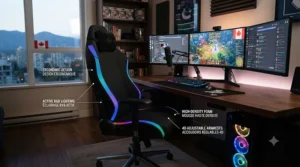
Picture this: your monitor’s off, the room’s dark except for one glowing shape behind your desk, and it’s pulsing gently in time with whatever’s thumping out of your headphones. That’s the whole appeal of an rgb gaming chair in one sentence — it’s furniture that moonlights as a mood ring. But here’s what nobody tells you before you start scrolling through listings at 1 a.m.: the light show is the easy part. The hard part is figuring out which chair actually holds up after eight months of daily sitting, whose “16 million colours” claim is real versus marketing filler, and whether that bluetooth speaker built into the headrest is a genuine feature or a gimmick that dies in three weeks. We dug into real specs, real owner feedback, and the fine print so you don’t have to. Canadian shoppers also deal with a wrinkle American buyers don’t: shipping costs, provincial furniture-recycling fees, and the reality that a chair rated for U.S. outlets still needs to play nice with our 120V standard (it does, for the record, but always check for a CSA or cUL mark before you plug anything in). This guide walks through seven real rgb gaming chair options across every price tier, how the led gaming chair category actually works day-to-day, and where the light up gaming chair trend is heading in 2026.
Quick Comparison Table
| Chair | Best For | Price Range (CAD) | Lighting Control | Speakers |
|---|---|---|---|---|
| Dowinx LS-66LED03 | Best all-around budget pick | C$220–C$280 | Remote + app | No |
| Dowinx 4D Arms RGB | Best premium ergonomics | C$330–C$400 | Remote + app + voice | No |
| GTPLAYER RGB Chair | Best for built-in audio | C$260–C$320 | Remote | Yes |
| Mr IRONSTONE LED Chair | Best budget speaker combo | C$180–C$230 | Remote | Yes |
| Homall RGB Ivory | Best light aesthetic variety | C$210–C$270 | Remote | No |
| Czlolo RGB Racing Chair | Best for smaller frames/teens | C$190–C$240 | Remote | No |
| Bigzzia RGB LED Chair | Best sleeper budget alternative | C$170–C$220 | Remote | No |
A quick scan of the table tells the real story: you’re not just paying for lights, you’re paying for how those lights get controlled and what else is bolted onto the chair around them. The jump from remote-only control to app-based control (as seen on the Dowinx models) matters more than it sounds, because a lost remote turns a light up gaming chair into a very expensive plain one. Meanwhile, the two speaker-equipped options — GTPLAYER and Mr IRONSTONE — sit at opposite price extremes, which says something about how commoditized that feature has become. If your budget tops out under C$250, the Bigzzia and Czlolo models prove you don’t need to spend big to get a legitimately colourful s
💬 Just one click — help others make better buying decisions too!😊
What Is an RGB Gaming Chair?
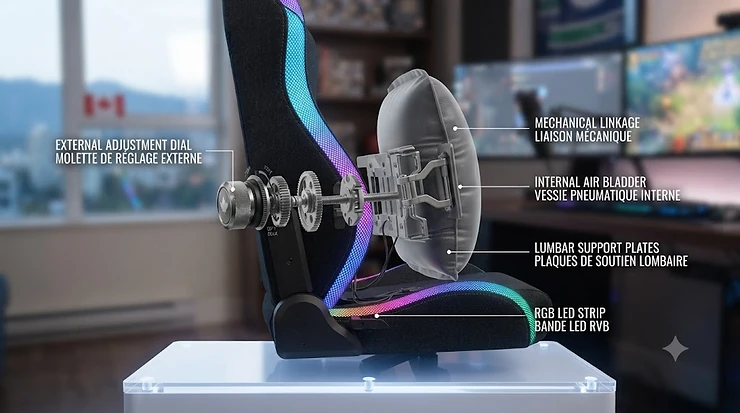
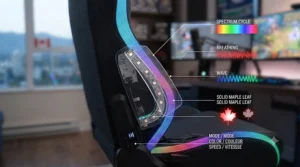
An rgb gaming chair is a gaming or ergonomic office chair fitted with programmable LED strips — usually along the backrest and seat edges — that can shift through millions of colour combinations via a remote, Bluetooth app, or music-sync sensor, layered on top of standard gaming-chair ergonomics like lumbar support and recline.
That’s the textbook version. In practice, what you’re buying is two products stapled together: a chair, and a lighting rig. Both need to be evaluated on their own terms, which is exactly why so many buyers get burned — they fall in love with the glow in a thumbnail photo and forget to check whether the actual seat cushion holds up.
Top 7 RGB Gaming Chairs: Expert Analysis
1. Dowinx LS-66LED03 — best all-rounder for the price
The Dowinx LS-66LED03 opens strong with genuinely wide colour coverage, and that’s not just marketing fluff — Dowinx’s own listings back up over 225 preset RGB modes, which is unusually deep for a chair under C$300. The lighting runs along the backrest seams and seat edge, controlled through a handheld remote or the Dowinx companion app, with a music-reactive mode that pulses to bass rather than just flashing randomly. Underneath the glow sits a fairly standard but competent frame: an SGS-certified class-3 gas lift rated to roughly 400 lbs, a 90°–135° recline range, and a lumbar pillow that clips onto the backrest rather than being sewn in. What most buyers overlook about this model is that the pillow attachment system means you can wash the cover without disassembling the whole chair — a small thing, but it adds up over two years of ownership. This is the pick for someone furnishing their first real setup who wants the RGB novelty without gambling their whole budget on it; students and casual gamers get the most mileage here, while anyone over 6’2″ may find the seat depth a touch short. Reviewers consistently report that the initial “wow” factor of the lighting holds up well past the first month, though a handful mention the USB light controller cable is short enough that cable routing takes some planning during assembly. A common complaint in user reviews is that the PU leather can feel warm during long summer sessions without air conditioning — worth knowing if your gaming room doesn’t have great airflow.
Pros:
- ✅ 225+ RGB preset modes is class-leading for the price
- ✅ App and remote control, not remote-only
- ✅ Removable lumbar pillow simplifies cleaning
Cons:
- ❌ PU leather retains heat in warm rooms
- ❌ Seat depth runs short for taller users
Expect to pay somewhere in the C$220–C$280 range depending on colourway and promotions; at that price, with genuine app control and this many lighting modes, the value case is hard to beat for a first-time buyer.
2. Dowinx 4D Arms RGB Recliner — best ergonomics for serious sessions
Step up to the Dowinx 4D Arms RGB Recliner and the standout feature isn’t actually the lights — it’s the armrests, which adjust in six directions instead of the usual up-down-swivel most budget chairs offer. On paper this means your elbows can find a genuinely neutral position regardless of desk height, which is exactly the kind of adjustability CCOHS points to as central to reducing shoulder strain for anyone sitting long hours. The lighting system carries over the app-and-remote combo from the entry-level Dowinx model but adds voice-activated triggering, so the chair can react to ambient sound without a phone in hand. Frame-wise, this is a nylon-mesh-backed build with a molded foam seat and a reinforced gas lift, which reviewers frequently point to as the reason this chair feels noticeably more stable during aggressive recline than cheaper competitors. Based on the spec comparison with the entry Dowinx, the price difference mostly buys you the 4D arm mechanism and slightly beefier materials rather than more RGB features — so if lighting variety is your only priority, this isn’t where the extra money goes. This model is built for the person who’s at their desk 6+ hours a day, whether that’s remote work, university coursework, or competitive gaming — the ergonomic upgrade pays for itself in comfort long before the lighting does. Aggregated owner feedback is largely positive on long-term comfort, though a recurring theme is that assembly takes noticeably longer than the base model due to the extra armrest hardware.
Pros:
- ✅ Six-way 4D armrests genuinely reduce shoulder strain
- ✅ Voice-activated lighting trigger, not just app/remote
- ✅ Reinforced gas lift feels sturdier on recline
Cons:
- ❌ Assembly is noticeably longer and fiddlier
- ❌ Premium price doesn’t add new lighting modes
Priced around C$330–C$400, this sits at the premium end of the category — justified if you value the ergonomic jump, less so if lighting variety alone is driving your decision.
3. GTPLAYER RGB Chair with Bluetooth Speakers — best for built-in audio
The GTPLAYER RGB Chair with Bluetooth Speakers earns its spot by tackling the rgb gaming chair with bluetooth speakers niche directly, embedding small drivers into the headrest that pair over Bluetooth rather than requiring a wired aux connection. That’s a meaningfully different experience from headphones — it’s ambient, room-filling sound that suits solo late-night sessions where you want ambiance without clamping something onto your ears for six hours straight. The RGB lighting runs along the usual backrest and seat-edge zones with remote-only control, so there’s no companion app here, which is a deliberate trade-off keeping the price down. Structurally, the chair uses a linkage-armrest system and a reclining backrest that goes to 135°, respectable but not class-leading. Here’s what the spec sheet won’t tell you, but user reports suggest: the built-in speakers are genuinely fine for casual background music or podcast listening, but they’re not going to replace a proper headset for competitive gaming where directional audio cues matter. This is the pick for streamers and content creators who want ambient music playing during downtime between takes, or anyone who splits time between gaming and general desk work and likes having audio without extra hardware cluttering the desk. Aggregated reviews note the speaker volume tops out lower than expected, and a common complaint is Bluetooth pairing occasionally needing a restart after the chair’s been powered off overnight.
Pros:
- ✅ Genuine built-in Bluetooth speakers, not a gimmick
- ✅ 135° recline with linkage armrests for comfort
- ✅ Solid value in the speaker-equipped category
Cons:
- ❌ Speaker volume ceiling is modest
- ❌ Bluetooth occasionally needs a reconnect after standby
Typically found in the C$260–C$320 range, it slots into the mid-tier and earns that price mainly through the audio feature rather than lighting sophistication.
4. Mr IRONSTONE LED Chair with Bluetooth Speakers — best budget speaker combo
The Mr IRONSTONE LED Chair with Bluetooth Speakers is the budget counterpart to the GTPLAYER above, and the standout here is simply how much is packed in under a C$230 ceiling — LED lighting, Bluetooth audio, a massage lumbar cushion, and 3D armrests all show up on a chair priced like an entry-level option. Mr IRONSTONE has built a reputation on Amazon for exactly this kind of value stacking, and the frame — a metal-reinforced base with a class-3 gas lift — holds its own against pricier alternatives in day-to-day use. The lighting is simpler than the Dowinx options, running fewer preset modes through remote control only, but it still delivers the ambient glow that defines the category. What most buyers overlook about this model is that the massage function runs on its own small motor and battery pack rather than drawing off the main chair power, meaning it can be used independently of the lighting system — useful if you want the massage feature without draining anything tied to the RGB circuit. Based on the spec comparison, this is squarely a beginner and budget-conscious buyer’s chair: it won’t win a durability contest against premium builds, but for someone furnishing a first setup on a tight budget, it’s hard to find more features per dollar. Reviewers consistently report satisfaction with the value proposition, though a recurring theme is that the PU leather shows wear faster than pricier alternatives after a year of regular use.
Pros:
- ✅ Bluetooth speakers, massage, and LEDs all under C$230
- ✅ Independent massage motor doesn’t tax lighting circuit
- ✅ Strong feature-per-dollar ratio for beginners
Cons:
- ❌ Upholstery wear shows earlier than pricier options
- ❌ Fewer lighting presets than Dowinx models
Expect a price around C$180–C$230, making it one of the most accessible entries into the rgb gaming chair with bluetooth speakers subcategory.
5. Homall RGB Ivory — best lighting aesthetic variety
The Homall RGB Ivory stands out by breaking from the all-black gaming-chair mold, offering a lighter ivory colourway that actually shows off the LED strips differently — the light diffuses more visibly against pale upholstery than it does on darker frames, which is a small but real difference for anyone building a streaming setup where the chair sits in-frame. Underneath the aesthetic, this is a fairly conventional mid-range build: a footrest, adjustable lumbar massage cushion, and a swivel base rated for typical adult weights. The lighting runs on remote control with multiple flash and breathing patterns, though it lacks app connectivity. What the spec sheet doesn’t capture is how much the light colour choice affects the overall vibe of a room — reviewers frequently mention that the Ivory model reads as more “aesthetic setup” and less “gaming den,” which matters if the chair needs to double as a home-office piece during the day and a gaming centerpiece at night. This is a strong option for anyone prioritizing streaming setup aesthetics or curating a specific colour palette for their desk area, since the light shows up more distinctly against a neutral base than against black. Aggregated sentiment is mixed on long-term cushion firmness, with some owners noting the padding softens noticeably faster than expected under daily use.
Pros:
- ✅ Light colourway makes LED effects more visually distinct
- ✅ Strong fit for streaming or on-camera setups
- ✅ Multiple flash and breathing lighting patterns
Cons:
- ❌ No app control, remote only
- ❌ Cushion firmness softens faster than some competitors
Priced around C$210–C$270, this is a solid mid-tier pick specifically for buyers who care about how the chair photographs or streams, not just how it glows in person.

6. Czlolo RGB Racing Chair — best for smaller frames and younger gamers
The Czlolo RGB Racing Chair leans into a slightly narrower, lighter build than most entries here, which makes it a standout pick for teens or smaller adults who find full-size gaming chairs swallow them up. The lighting setup includes multiple pure-colour modes plus full RGB effects, controlled through the standard remote, and the seat plate uses FSC-certified wood — a detail that matters if sustainable sourcing factors into your buying decision at all. A small neck pillow and a vibrating lumbar massager round out the comfort features, and the frame is rated to 350 lbs despite the more compact footprint. Here’s what most listings gloss over: a narrower seat isn’t just about fit, it’s also about stability, since a smaller frame paired with a properly rated gas lift and five-point base tends to feel less top-heavy during recline than an oversized chair scaled down cheaply. This is the pick for a shared family gaming room, a teen’s bedroom setup, or anyone under roughly 5’8″ who’s found standard gaming chairs feel oversized. Aggregated review sentiment notes assembly is straightforward and completed within about 30 minutes per the manufacturer’s own claim, which several buyers independently confirmed, while a common critique is that the armrests lack the multi-directional adjustment found on pricier options.
Pros:
- ✅ Genuinely better fit for smaller frames and teens
- ✅ FSC-certified wood seat plate
- ✅ Straightforward, well-documented assembly
Cons:
- ❌ Armrests adjust in fewer directions than premium models
- ❌ 350 lb weight rating is lower than most competitors
Found around C$190–C$240, it’s a smart pick specifically for households buying for a smaller or younger user rather than a general-purpose adult chair.
7. Bigzzia RGB LED Chair — best sleeper budget alternative
The Bigzzia RGB LED Chair rounds out the list as the lesser-known name here, but it earns its place by matching the core feature set of pricier competitors — LED lighting with adjustable modes and brightness, a 90°–155° reclining range, and a removable neck pillow and lumbar cushion — at a price that regularly undercuts the bigger brands. Bigzzia built its base in the fitness-equipment space before expanding into gaming furniture, and that frame-engineering background shows up in the durable nylon casters and cold-molded foam seat, which reviewers note holds shape better over time than cheaper cut foam. The lighting is remote-controlled only, without app or voice features, keeping the price down but limiting flexibility for anyone who wants scene presets tied to specific games or moods. What most buyers overlook about lesser-known brands like this one is that a narrower customer base often means faster, more attentive customer support — Bigzzia’s listings emphasize free replacement parts and installation guidance, a genuinely useful safety net for a first-time chair assembler. This is a strong option for budget-conscious buyers who’ve already compared the bigger names and want to see whether a smaller brand can match the feature list for less — in this case, largely yes. Reviewer sentiment is generally positive on comfort and recline range, though a recurring theme in aggregated feedback is that the LED strip adhesive can loosen at the edges after a year of regular use.
Pros:
- ✅ Matches bigger brands’ feature list at a lower price
- ✅ 90°–155° recline range is wider than most competitors
- ✅ Responsive customer support per user reports
Cons:
- ❌ LED strip adhesive may loosen over time
- ❌ No app or voice control options
Typically priced C$170–C$220, this is the value pick for someone who’s done their homework and wants to stretch their budget without giving up the core RGB experience.
Top 7 Products: Full Comparison Table
| Chair | Weight Capacity | Recline Range | Control Method | Best For | Price (CAD) |
|---|---|---|---|---|---|
| Dowinx LS-66LED03 | ~400 lbs | 90°–135° | Remote + app | Budget all-rounder | C$220–C$280 |
| Dowinx 4D Arms RGB | ~400 lbs | 90°–135° | Remote + app + voice | Long sessions/ergonomics | C$330–C$400 |
| GTPLAYER RGB Chair | ~330 lbs | Up to 135° | Remote | Ambient audio | C$260–C$320 |
| Mr IRONSTONE LED Chair | ~300 lbs | Up to 135° | Remote | Budget + speakers | C$180–C$230 |
| Homall RGB Ivory | ~300 lbs | Up to 135° | Remote | Streaming aesthetics | C$210–C$270 |
| Czlolo RGB Racing Chair | 350 lbs | Up to 155° | Remote | Smaller frames | C$190–C$240 |
| Bigzzia RGB LED Chair | ~300 lbs | 90°–155° | Remote | Sleeper value pick | C$170–C$220 |
Laid side by side, the pattern is clear: weight capacity and recline range barely move the price needle, but control method does — every chair with app or voice control sits at or above C$260. If you’re buying primarily for the lighting experience rather than deep ergonomic needs, the Bigzzia and Czlolo models prove you can get 90% of the visual payoff for nearly half the cost of the premium Dowinx option.
💬 Which glow-up matches your setup? Compare the full lineup and find your fit!
Setting Up Your RGB Gaming Chair the Right Way
Getting the lighting right is only half the job — most of the disappointment people report with a new led gaming chair traces back to setup mistakes in the first week rather than the chair itself. Start by charging or fully connecting the light controller before you build the chair around it; several models route the LED wiring through the backrest frame, and it’s far easier to test the lights while the panels are still loose than after everything’s bolted tight. Once assembled, adjust the seat height first using the CCOHS guidance of keeping your feet flat and knees near a 90-degree angle, then set armrest height only after that — doing it in the reverse order is a common mistake that leaves people compensating with hunched shoulders. For the lighting itself, spend ten minutes cycling through every preset mode once so you actually know what’s available; most buyers settle on two or three favourites and never explore the rest, missing modes like music-sync or timer functions that end up being genuinely useful later. A maintenance habit worth adopting early: wipe down the LED strip housing monthly, since dust buildup along the seat edges is one of the more common reasons lighting appears dimmer over time. Finally, if your chair uses a USB-powered ambient lighting controller rather than a hardwired connection, route that cable along the frame with the included clips rather than letting it dangle — a stray cable near the base is both a light-buggy annoyance and a minor trip hazard near a rolling chair.
Real-World Scenarios: Which Chair Fits Your Setup?
Consider three different buyers working through this same decision. First, a university student moving into a shared apartment with a tight C$250 budget and a desk crammed into a bedroom corner — the Mr IRONSTONE LED Chair or Bigzzia RGB LED Chair make the most sense here, since both deliver the core RGB experience without demanding premium spend, and neither requires much floor space to shine. Second, a full-time remote worker who also games competitively most evenings and sits for eight-plus hours daily — this profile benefits most from the Dowinx 4D Arms RGB Recliner, where the ergonomic upgrade pays dividends against fatigue long before the lighting becomes the selling point. Third, a part-time Twitch streamer building a setup that needs to look good on camera as much as it needs to feel good to sit in — the Homall RGB Ivory earns its spot here specifically because lighter upholstery makes the LED colours read more vividly on stream, and pairing it with the GTPLAYER RGB Chair’s built-in speakers (if audio ambiance matters more than camera aesthetics) rounds out that persona depending on which trade-off matters more. None of these are universal answers — they’re a starting framework based on how each chair’s actual strengths map onto real daily use, not just spec-sheet comparisons.
How to Choose an RGB Gaming Chair
- Decide app versus remote-only control first. If you want scene presets tied to games or music sync, app-controlled models like the Dowinx line justify their higher price; if you just want ambient colour, remote-only saves money without sacrificing much.
- Match weight capacity to your actual build, not the average. Manufacturers rate for a “typical” user; if you’re above 220 lbs, prioritize the 400 lb-rated options over anything closer to 300 lbs.
- Check recline range against your actual habits. A 155° recline (like Bigzzia or Czlolo) matters if you nap or watch content in the chair; if you mostly sit upright at a desk, 135° is plenty.
- Consider room lighting conditions. LED effects show up more dramatically in dim rooms — if your setup is well-lit during the day, factor in whether the glow will actually be visible when you need it.
- Weigh added features like Bluetooth speakers or massage against your real use case. These add cost and potential failure points; only pay for them if you’ll genuinely use them weekly, not just at unboxing.
- Read the fine print on frame material. PU leather is easier to clean but runs warmer; fabric breathes better but shows stains more visibly over time.
- Confirm the electrical component carries a recognized certification mark. Per Health Canada’s guidance on electrical product safety, always check for CSA, cUL, or cETL markings on the lighting controller and any USB power adapter before plugging it in.
RGB Gaming Chairs vs. Standard Gaming Chairs
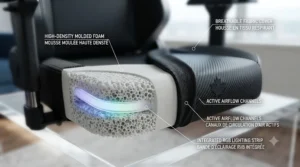
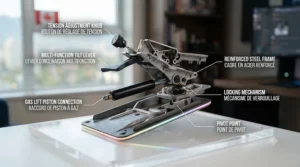
The core mechanical difference between an rgb gaming chair and a standard gaming chair is minimal — both typically share the same frame types, recline mechanisms, and lumbar-support approaches. What actually separates them is the added electronics: LED strips, a controller board, and either a remote or Bluetooth module layered onto an otherwise conventional design. That matters practically in two ways. First, cost: expect to pay roughly C$40–C$80 more for the lighting feature alone compared to an equivalent non-lit chair from the same brand, since you’re paying for wiring, a driver board, and the LEDs themselves. Second, failure points: a standard chair’s only electronic component is usually the seat’s massage motor if it has one, while an RGB model adds a lighting controller, wiring routed through moving joints, and sometimes a Bluetooth chip — each an additional thing that can eventually fail, even if none of them fail often in practice based on aggregated review patterns. On the upside, the value case for RGB isn’t purely cosmetic. For streamers and content creators, the lighting genuinely changes how a setup reads on camera, and for anyone who spends serious evening hours at their desk, an ambient light source that isn’t a harsh overhead bulb can make the whole experience feel more deliberate. If neither of those apply to you, though, the honest answer is that a standard gaming chair likely serves you just as well for meaningfully less money.
Long-Term Cost and Maintenance of an RGB Gaming Chair
Total cost of ownership for these chairs breaks into three buckets: the upfront price, replacement parts, and electricity. Upfront costs across this list range from roughly C$170 to C$400, but the gap narrows once you factor in longevity — a chair with a reinforced gas lift and better foam, like the Dowinx 4D Arms RGB Recliner, may cost more initially but avoid a mid-life cushion or lift replacement that a cheaper alternative might need around year two. Replacement parts worth budgeting for include the gas lift cylinder (a wear item on any chair with heavy daily use), the lumbar or headrest pillow cover, and occasionally the LED controller itself if it’s USB-powered and outlives its low-cost driver board. On the electricity side, LED lighting draws minimal power — these are low-wattage strips, not household bulbs — so the actual cost-per-use in electricity is close to negligible even running several hours nightly. Where the real ROI conversation lives is in comparing a C$220 budget RGB chair replaced every 18 months against a C$400 premium option that lasts four-plus years; run the math over five years and the premium option frequently comes out cheaper per year of use, provided the frame and gas lift genuinely hold up as reviewers suggest. The CCOHS also notes that ergonomic furniture should be reassessed periodically rather than treated as a one-time purchase, which applies just as much to a gaming chair used daily as it does to a traditional office chair.
Features That Actually Matter (And Those That Don’t)
Some spec-sheet bullet points genuinely change your day-to-day experience, and others are marketing filler dressed up as features. A wide recline range (135°–155°) actually matters if you use the chair for anything beyond upright sitting, since it changes whether the chair doubles as a nap or lounging spot. App control matters if you’re the kind of person who’ll actually open an app regularly — if you know yourself well enough to say you won’t, remote-only saves money without losing real functionality. On the other hand, headline colour-count claims like “16 million colours” don’t matter much in practice, since the human eye can’t meaningfully distinguish most of that range and nearly every RGB controller on the market draws from the same standard colour space regardless of how the marketing frames it. Similarly, “massage” features vary wildly in actual intensity — some are a genuinely soothing vibration, others are closer to a faint buzz you’ll forget exists within a week — so weigh this feature based on aggregated reviews rather than the listing copy alone. Built-in speakers are a real feature worth having if ambient audio fits your habits, but they’re not a headset replacement, and treating them as one will disappoint you in competitive play where directional sound cues matter.
Safety, Certification, and Regulations for RGB Gaming Chairs
Because these chairs combine upholstered furniture with active electronics, two separate safety considerations apply. On the furniture side, weight capacity ratings are tested under manufacturer conditions and should be treated as a ceiling, not a target — buying a chair rated right at your body weight leaves no margin for movement, recline stress, or normal wear over time. On the electrical side, any component that plugs into a wall outlet or charges via USB in Canada should carry a recognized certification mark. As Health Canada notes, electrical products that plug into an outlet must meet Canadian national safety standards and be certified by an accredited body, with CSA, cUL, and cETL being the marks to look for before you buy or plug anything in. This matters more than it might seem for imported gaming furniture, since not every listing clearly states which certification, if any, the lighting controller carries — it’s worth checking the product images or asking the seller directly if it isn’t obvious. Beyond the mark itself, basic precautions apply: don’t run the LED controller cable under carpet where heat can build up, avoid daisy-chaining the chair’s power adapter through an already-loaded power bar, and unplug the lighting controller if the chair will sit unused for an extended stretch.
Common Mistakes When Buying an RGB Gaming Chair
The most frequent mistake is buying entirely on the strength of a lighting demo video without checking the underlying ergonomics — a chair with dazzling RGB and a mediocre lumbar system will still leave you sore after long sessions, since the light doesn’t touch how the seat actually supports your spine. A second common error is underestimating weight capacity margins, picking a chair rated close to actual body weight rather than leaving meaningful headroom for durability over years of daily use. Third, many buyers skip checking whether the lighting is app-controlled or remote-only until after the chair arrives, then feel shortchanged when the “smart” features they assumed existed turn out to be a basic remote. Fourth, people frequently overlook fabric versus PU leather trade-offs in the context of their specific room — a chair that seemed fine in photos can feel uncomfortably warm in a room without strong airflow, something that only becomes obvious after a few months of ownership. Finally, a subtler mistake is ignoring the LED lighting control app entirely during the return window — if a chair ships with companion app support, testing every mode and connectivity feature in the first week (while returns are still easy) catches defects before you’re stuck with them.
RGB Gaming Chairs for Streamers and Content Creators
If your setup doubles as an on-camera backdrop, the calculus shifts a little from a purely personal-comfort purchase to one that also serves an audience. Lighter upholstery colours, like the Homall RGB Ivory, tend to show LED colour more vividly on camera than black frames, where the glow gets partially absorbed into the dark material. Camera framing also matters more than most first-time streamers expect — a chair with visible seat-edge lighting reads clearly in a wide shot, while backrest-only lighting might get cropped out entirely depending on your webcam angle, so it’s worth testing your actual camera framing against where the LEDs sit before committing. Streaming culture in Canada has grown substantially, with CBC coverage of local streaming communities noting that creators increasingly invest in dedicated equipment as their channels grow, and a visually distinct chair is a low-effort way to make a stream instantly recognizable across thumbnails. That said, resist over-indexing purely on camera appeal — you’ll spend far more total hours sitting in the chair off-camera than on it, so comfort and support should still carry more weight in the final decision than how the lighting photographs.
🔍 Take your gaming room to the next level with one of these carefully compared picks. Click through to check current pricing and availability before you commit. The right rgb gaming chair turns a plain desk corner into a genuine centerpiece you’ll actually look forward to sitting in every night!
Frequently Asked Questions
❓ Are RGB gaming chairs worth it compared to a regular gaming chair?
❓ Can I control an RGB gaming chair's lights with my phone?
❓ Do RGB gaming chairs use a lot of electricity?
❓ How long do the LED lights in a gaming chair typically last?
❓ Is a USB-powered ambient lighting chair safe to leave plugged in overnight?
Conclusion
The rgb gaming chair category has matured well past the point of being a gimmick bolted onto an otherwise ordinary chair — the better options on this list, from the budget-friendly Bigzzia RGB LED Chair to the ergonomics-forward Dowinx 4D Arms RGB Recliner, prove that lighting and genuine comfort aren’t mutually exclusive anymore. What separates a satisfying purchase from a regretted one usually isn’t the number of colour presets advertised on the box; it’s whether the frame, gas lift, and lumbar support hold up to your actual daily habits once the initial light show stops being a novelty. If you’re outfitting a first setup on a tight budget, start with the Mr IRONSTONE LED Chair or Czlolo RGB Racing Chair and don’t feel like you’re settling — both deliver the core experience without the premium price tag. If you’re sitting for eight-plus hours daily and comfort matters more than cost, the Dowinx 4D Arms RGB Recliner earns its higher price through real ergonomic gains, not just extra lighting modes. And if your setup needs to perform for an audience as much as it needs to feel good under you, weigh the Homall RGB Ivory’s on-camera presence against how much you’ll actually use its remote-only lighting day to day. Whichever direction you land, check current pricing before buying, confirm the certification marks on any electrical components, and give the chair a proper break-in period before judging long-term comfort — a week is rarely enough to know how a chair holds up.
Recommended for You
- Floor Gaming Chair: 7 Best Picks for Canadian Setups (2026)
- Best Gaming Office Chair 2026: 7 Real Picks for Canadians
- Xbox Gaming Chair 2026: 7 Picks That Actually Survive Long Sessions
Disclaimer: This article contains affiliate links. As an Amazon Associate, I earn from qualifying purchases. If you purchase products through these links, we may earn a small commission at no additional cost to you.
✨ Found this helpful? Share it with your friends! 💬🤗
