
In This Article
Your lower back knows exactly what a six-hour raid feels like, even if your brain is still riding the adrenaline. A massage gaming chair isn’t a gimmick bolted onto a regular seat for marketing flash — it’s a genuine attempt to solve the oldest problem in PC gaming: sitting still for way too long. Somewhere between the third boss fight and the fourth cup of coffee, your lumbar spine files a complaint, and no amount of “just stretch more” advice fixes it in the moment.
That’s the gap a massage gaming chair is built to close. Most models pair a vibration motor — usually tucked into a removable lumbar pillow — with the recline, footrest, and swivel base you’d expect from any gaming chair, then add a USB-powered pulse that kneads the lower back while you play. Some go further, layering in heating, cooling, or motorized spinal stretch functions that a plain cushion could never replicate.
This guide breaks down seven real, currently available massage gaming chairs for the Canadian market, from sub-C$250 budget options to premium ergonomic builds pushing past C$1,400. We’ll dig into what the vibration actually does (and doesn’t) fix, how to choose between fabric, PU leather, and mesh builds for our climate, and which chair fits which kind of desk setup — whether that’s a dorm room, a condo office, or a dedicated gaming den. Every recommendation here is grounded in real specs and aggregated review themes, not invented testimonials, so you can make a call you’ll actually be happy with three months from now.
Quick Comparison Table
| Chair | Massage Type | Price Range (CAD) | Weight Limit | Best For |
|---|---|---|---|---|
| GTPLAYER Gaming Chair with Footrest | Vibration lumbar pillow | C$180–C$250 | 136 kg (300 lb) | Tightest budget |
| GTRacing GT800A | Vibration lumbar pillow | C$260–C$340 | 113 kg (250 lb) | Most-reviewed pick in Canada |
| Yaheetech Electric Massage Chair | Vibration lumbar pillow | C$200–C$280 | 136 kg (300 lb) | Quiet shared spaces |
| Dowinx Cat Ear Gaming Chair | Vibration lumbar pillow | C$230–C$310 | 131 kg (290 lb) | Style-first buyers |
| FANTASYLAB Gaming Chair | Vibration lumbar pillow | C$190–C$260 | 113 kg (250 lb) | All-round value with footrest |
| LiberNovo Omni | Motorized spinal stretch massage | C$1,450–C$1,600 | 136 kg (300 lb) | Serious home office ergonomics |
| DXRacer Martian Pro Red Triangle | Built-in massager + heat/cool | C$1,150–C$1,300 | 125 kg (275 lb) | Massage plus temperature control |
Looking at the spread above, the pattern is pretty clear: under C$350, you’re buying a solid gaming chair with a bolt-on vibration lumbar pillow, and that pillow is basically the same core technology across every budget option — a small vibrating motor, a USB cable, and a couple of intensity settings. Once you cross into four-figure territory with the LiberNovo Omni or DXRacer Martian Pro Red Triangle, the “massage” stops being an accessory and becomes part of the chair’s actual engineering, which is where the price jump earns its keep. If your budget realistically caps around C$300, don’t agonize over which vibration pillow is “best” — focus instead on build quality, weight rating, and whether the chair fits your frame, because the massage function itself won’t meaningfully differ between the affordable options.
💬 Just one click — help others make better buying decisions too!😊
What Is a Massage Gaming Chair?
A massage gaming chair is a gaming or ergonomic office chair with a built-in or removable vibration motor — most often housed in the lumbar pillow — that delivers rhythmic pulses to the lower back to ease muscle tension during long sitting sessions. Higher-end versions add heating, cooling, or motorized stretch functions layered on top of the standard recline-and-swivel gaming chair frame.
Think of it less as a spa treatment and more as a fidget for your back — a small, constant nudge that keeps blood moving through muscles that would otherwise just sit there tightening up.
Top 7 Massage Gaming Chairs: Expert Analysis
1. GTPLAYER Gaming Chair with Footrest — best budget pick with a massage pillow included
The GTPLAYER Gaming Chair with Footrest built its reputation on doing the basics without the four-figure price tag, and the bundled massage lumbar pillow is what pushes it onto this list instead of a generic budget seat.
The chair reclines between 90 and 155 degrees, runs on a retractable footrest, and holds up to 136 kg (300 lb) on a BIFMA-tested steel frame. In practice, that recline range matters more than the spec sheet suggests — you can actually flatten it enough for a proper nap between matches, which most sub-C$250 chairs can’t manage without the frame feeling flimsy underneath you.
Based on the spec comparison against similarly priced competitors, this is the pick for renters, students, or anyone furnishing a first home office who wants massage functionality without committing real money to it. What most buyers overlook about entry-level chairs like this one is that the PU leather upholstery, while easy to wipe clean, does retain heat over long sessions — something to weigh if your setup runs warm.
Reviewers consistently report that the vibration pillow’s low setting is subtle enough for late-night use without disturbing a partner or roommate, while the high setting is strong enough to actually notice. A common complaint in user reviews is that the pillow’s USB cord is a bit short for chairs positioned far from a power bar.
Pros:
- ✅ Full recline range good enough for actual napping
- ✅ 136 kg weight capacity well above the category average
- ✅ Massage pillow included at no extra cost
Cons:
- ❌ PU leather retains heat in warmer rooms
- ❌ Massage cord length can be limiting near some desks
Priced around C$180–C$250 depending on colour and current promotions, this is arguably the best value entry point for anyone testing whether vibration massage is worth having in a chair at all before spending more.
2. GTRacing GT800A — most popular vibration massage lumbar pillow in Canada
The GTRacing GT800A shows up repeatedly in Canadian gaming chair roundups, and for good reason — it’s one of the more consistently available massage-equipped models at major Canadian retailers, including Amazon.ca.
Its 360-degree swivel base and 90–135-degree reclining backrest are standard for the category, but the multi-point seat height adjustment and eight available colourways give it more personalization than most budget competitors. Health Canada and workplace safety bodies note that alternating posture throughout the day helps offset the effects of static sitting, and the GT800A’s wide recline window makes that kind of posture-shifting genuinely easy to do without leaving the chair.
Here’s what to weigh: the faux leather version is the one most commonly stocked, and it runs warmer than the fabric variant sold directly through GTRacing’s own site — worth checking before you commit if you tend to run hot. Once the USB cord is plugged in, the massage lumbar pillow delivers a steady vibration aimed at supporting and easing lower-back discomfort during extended sessions, which is the entire point of buying this category of chair in the first place.
Aggregated review sentiment highlights the massage pillow as a genuine highlight feature rather than an afterthought, with users specifically calling it out as a differentiator versus otherwise-similar chairs in the same price bracket.
Pros:
- ✅ Widely stocked across major Canadian retailers
- ✅ Eight colour options for different room aesthetics
- ✅ Multi-point height adjustment beyond the category norm
Cons:
- ❌ Faux leather retains heat during long sessions
- ❌ 113 kg weight limit is lower than some rivals
Expect to pay in the C$260–C$340 range, positioning this chair as a step up from pure entry-level without approaching mid-range ergonomic pricing.
3. Yaheetech Gaming Chair with Electric Massage Lumbar Support — quietest massage motor for shared spaces
The Yaheetech Gaming Chair with Electric Massage Lumbar Support targets a specific frustration with budget massage chairs: motor noise. If you’ve ever had a vibrating lumbar pillow buzz loud enough to hear over your headset, this is the chair built to avoid that exact complaint.
Rated to 136 kg (300 lb), the frame uses a height-adjustable design paired with a heavy-duty base, which on paper means it should handle taller or heavier users better than several competitors in the same price tier. Based on the spec comparison, the electric massage function draws power over USB and includes intensity settings, though Yaheetech doesn’t publish a decibel rating — reviewers instead describe it in relative terms, which is honestly the most reliable signal you’ll find for a feature this hard to quantify.
What most buyers overlook is that a quieter motor usually means a gentler massage, not a stronger one dialed down — so if you’re expecting a deep-tissue-style pulse, this chair’s massage will likely feel more like a subtle hum than an aggressive knead. That’s an intentional trade-off, and it’s the right one for open-plan apartments, shared offices, or anyone gaming late while others sleep nearby.
A common theme in user feedback is praise for the chair’s stability during recline, with less frequent mention of squeaking or wobble than typically shows up in reviews of similarly priced alternatives.
Pros:
- ✅ Noticeably quieter massage motor than most rivals
- ✅ 136 kg weight rating suits larger frames
- ✅ Stable recline mechanism per aggregated reviews
Cons:
- ❌ Massage intensity is gentler, not a deep-tissue feel
- ❌ No published noise specification to verify claims
Pricing typically lands between C$200 and C$280, making it a reasonable middle path between the GTPLAYER and GTRacing options above.
4. Dowinx Cat Ear Gaming Chair with Massage Lumbar Support — best for style-conscious gamers who want massage too
The Dowinx Cat Ear Gaming Chair with Massage Lumbar Support proves that a chair built around a niche aesthetic doesn’t have to skip the practical features. Dowinx built its reputation on colourful, distinctive gaming chairs, and adding a massage lumbar pillow to the cat-ear silhouette was a smart move rather than a tacked-on afterthought.
Rated for up to 131 kg (290 lb), the chair includes a reclining backrest, retractable footrest, and adjustable headrest alongside the removable massage pillow. On paper, this means buyers get the full standard gaming-chair feature set without sacrificing anything to make room for the massage function — a genuine plus compared to some competitors that trim other features to hit a lower price point.
Reviewers consistently note that the distinctive design — particularly popular with younger gamers, streamers, and anyone decorating a room-focused setup — doesn’t come at the cost of comfort, with the padded seat and lumbar pillow drawing specific praise. What the spec sheet won’t tell you, but reviewer feedback suggests, is that the pink and cream colourways show wear on the piping faster than the darker colour options, simply because scuffs are more visible on lighter upholstery.
This is a strong pick for anyone who wants their setup to look intentional and personal rather than generic, without giving up the practical massage function that makes long sessions more bearable.
Pros:
- ✅ Distinctive design without sacrificing core features
- ✅ Full recline, footrest, and headrest included
- ✅ Massage pillow removable for easy cleaning
Cons:
- ❌ Lighter colourways show scuffs more visibly
- ❌ 131 kg limit is mid-pack, not class-leading
Typical pricing sits around C$230–C$310, positioning it as a style-forward alternative to the more generic-looking budget options above.
5. FANTASYLAB Gaming Chair with Massage Lumbar Support — best all-round value with retractable footrest
The FANTASYLAB Gaming Chair with Massage Lumbar Support and Retractible Footrest earns its spot through sheer feature density at a modest price — free USB electric massage cushion, removable headrest, retractable footrest, and a 90–135-degree recline that locks at any point within that range.
Rated to 113 kg (250 lb), it’s not the chair for larger frames, but for buyers within that weight range, the flat wide seat and high-density foam are designed specifically to resist the sagging that cheaper foam develops after a few months of daily use. Based on the spec comparison, the explosion-proof gas spring and steel frame construction are standard safety features you should expect in this category regardless of price — their presence here isn’t a differentiator, but their absence in a competing chair would be a red flag.
What most buyers overlook about chairs at this price point is how much the armrest adjustability matters day-to-day; FANTASYLAB includes adjustable armrests alongside adjustable seat height, which fewer budget competitors offer as standard. Aggregated review sentiment points to the massage lumbar cushion as functional and appreciated, if not dramatically different from the vibration pillows bundled with other budget chairs on this list — which tracks, since most of these motors come from a small pool of similar OEM suppliers.
Pros:
- ✅ Adjustable armrests included at a budget price
- ✅ High-density foam resists premature sagging
- ✅ Locks at any recline point between 90–135°
Cons:
- ❌ 113 kg weight limit excludes larger users
- ❌ Massage motor is functionally similar to rivals, not distinct
Priced around C$190–C$260, this is a genuinely well-rounded choice for smaller-to-average frames prioritizing everyday adjustability.
6. LiberNovo Omni — most advanced spinal massage engineering
The LiberNovo Omni isn’t really competing with the budget chairs above — it’s a different category entirely, and its “OmniStretch massage” feature is the clearest example of why. Instead of a simple vibrating pillow, the Omni’s motorized lumbar support actively increases and decreases pressure in a five-minute cycle designed to stretch the spine, not just buzz against it.
Rated to 136 kg (300 lb), the chair uses a multi-density foam seat — firmer at the back for support, softer at the front to reduce leg pressure — combined with an eight-panel articulated backrest that flexes with your body rather than staying rigid. On paper, this means the Omni behaves more like a dynamic ergonomic office chair that happens to game well than a gaming chair with office pretensions, which is a meaningful distinction if your daily reality is eight hours of work followed by a few hours of gaming in the same seat.
Independent reviewers who’ve spent extended time in the chair describe the spinal massage feature as a genuine standout, not marketing fluff — a rare endorsement in a market full of vibration pillows dressed up with premium language. The trade-off is battery-dependent electronics: the motorized lumbar and massage functions rely on a rechargeable system with only a two-year warranty on electronics against a five-year warranty on the frame, a gap worth factoring into your decision if you’re the type who wants a chair to last a decade.
This is the chair for someone who has already decided ergonomics matter more than gamer aesthetics, and who’s willing to pay accordingly for the difference between a massage that’s genuinely engineered and one that’s simply included.
Pros:
- ✅ Motorized spinal stretch, not just vibration
- ✅ Articulated backrest flexes with body movement
- ✅ Multi-density foam tuned for all-day sitting
Cons:
- ❌ Electronics carry only a 2-year warranty
- ❌ Premium price puts it out of reach for casual buyers
At roughly C$1,450–C$1,600, this is a serious investment — but for anyone spending most of their waking hours at a desk, the value proposition holds up better than it might first appear.
7. DXRacer Martian Pro Red Triangle — best massage plus heating and cooling combo
The DXRacer Martian Pro Red Triangle takes the opposite approach from the Omni: rather than reinventing lumbar support, it stacks a built-in massager on top of a genuinely well-built traditional racing-style frame, then adds heating and cooling for good measure.
Rated for users under 125 kg (275 lb) in its large and XL sizes, the chair features 4D lumbar supports adjustable in four directions alongside 4D armrests, and reclines to 135 degrees — not fully flat, but enough to lean back comfortably between rounds. Its massage feature runs off the same rechargeable battery pack as the heating and cooling systems, which independent reviewers note can drain in a matter of days if all three functions see regular use, so daily charging becomes part of the routine rather than an occasional chore.
Based on the spec comparison, the standout here isn’t any single feature but the combination — very few chairs at any price genuinely deliver working massage, heating, and cooling in one seat without one function feeling like an afterthought. Reviewers specifically praised the solid steel frame construction, though several noted the chair’s substantial weight (over 31 kg/70 lb) makes it a two-person job to move once assembled.
For gamers who run cold in the winter and overheat in the summer — a real problem in Canadian homes with big seasonal temperature swings — the combined heat/cool/massage trio genuinely earns its premium price in a way a single-function chair simply can’t match.
Pros:
- ✅ Massage, heating, and cooling in one seat
- ✅ Solidly built steel frame construction
- ✅ 4D lumbar and 4D armrests for fine-tuned fit
Cons:
- ❌ Battery drains quickly with all features active
- ❌ Very heavy — difficult to reposition once built
Expect to pay around C$1,150–C$1,300, which — relative to buying a separate heated cushion, cooling pad, and massage pillow — actually represents reasonable value for the combined functionality.
✨ Don’t Miss These Exclusive Deals!
🔍 Take your home office comfort to the next level with these carefully selected massage gaming chairs. Click on any highlighted item to check current pricing and availability. These picks will help you build a setup that actually supports the hours you spend in it!
How Vibration Massage Technology Actually Works (And What It Won’t Fix)
Vibration massage technology in gaming chairs almost always comes down to one of two small DC motors embedded in the lumbar pillow, spinning off-centre weights to create a buzzing pulse against the lower back. It’s the same basic mechanism used in handheld massage devices, just built into upholstery and powered by USB instead of a battery pack.
On paper, this means the “massage” is closer to a percussive nudge than a therapeutic deep-tissue treatment — it increases local blood flow and gives tense muscles something to react against, which genuinely does reduce the sensation of stiffness during long sessions. What the spec sheet won’t tell you, but physiotherapy-adjacent research on prolonged sitting suggests, is that vibration alone won’t undo the structural effects of static posture; it treats the symptom (tightness) in real time rather than the cause (staying in one position for hours). The Canadian Centre for Occupational Health and Safety is explicit that no single seated posture is correct for extended periods, and that alternating position — not a vibrating cushion alone — is the actual fix for prolonged-sitting strain.
Premium chairs like the LiberNovo Omni sidestep this limitation partially by combining vibration-adjacent stretch mechanics with a backrest that physically moves as you shift, rather than relying on buzzing alone. That’s a meaningfully different approach, and it’s part of why the price gap between budget and premium massage chairs is as large as it is.
The honest takeaway: a massage gaming chair helps you tolerate long sessions more comfortably, but it works best paired with regular position changes and short breaks — not as a replacement for either.
How to Choose a Massage Gaming Chair
- Match the weight rating to your actual body weight, not the marketing number. A chair rated for 136 kg (300 lb) will feel noticeably sturdier at 90 kg than one rated right at your weight — buy above your needs, not exactly at them.
- Decide whether you want a removable or built-in massage pillow. Removable pillows are easier to replace when the motor eventually wears out, which every vibration motor eventually does.
- Check the recline range against how you actually use the chair. If you want to nap between sessions, look for at least 150 degrees; if you mostly sit upright while gaming, 135 degrees is plenty.
- Factor in upholstery for your room’s temperature. PU leather looks sharp but runs hot; fabric or mesh breathes better through a Canadian summer without air conditioning.
- Compare warranty terms on electronics specifically, not just the frame. Massage motors and heating/cooling systems tend to carry shorter warranties than the steel frame around them — read the fine print.
- Think about footprint and mobility before you buy. Premium chairs like the DXRacer Martian Pro Red Triangle are heavy enough that repositioning them regularly is a genuine hassle.
- Set a price range and stick close to it. Beyond roughly C$300, you’re paying for build quality and secondary features, not a meaningfully stronger massage — the vibration itself plateaus quickly across price tiers.
Gaming Chairs with Vibration Massage vs Traditional Gaming Chairs
The core question worth asking honestly: does adding vibration massage to a gaming chair actually change the experience, or is it a checkbox feature that sounds better than it performs? Based on the spec and review comparison across this list, the answer depends heavily on price tier.
In the budget category, gaming chairs with vibration massage and traditional gaming chairs without it are often built on nearly identical frames — the massage pillow is a genuinely modular add-on rather than a design philosophy. A GTPLAYER Gaming Chair with Footrest and its non-massage sibling share the same steel frame, gas lift, and recline mechanism; the only real difference is a small motor and a USB cord. For buyers on a tight budget, that makes the decision simple: if the massage pillow costs little to nothing extra, there’s minimal downside to including it.
At the premium tier, the comparison shifts entirely. Traditional premium gaming chairs — think Secretlab-style racing chairs — compete on adjustability, upholstery quality, and warranty length, while massage-equipped premium chairs like the LiberNovo Omni and DXRacer Martian Pro Red Triangle are engineering their entire value proposition around active comfort features. You’re not choosing between “chair with massage” and “same chair without it” anymore; you’re choosing between two genuinely different design philosophies, and the massage-equipped option typically costs 20–40% more for that added engineering.
The practical verdict: at the low end, choose based on frame quality and fit first, treating massage as a nice-to-have bonus. At the high end, the massage and comfort engineering genuinely justify the premium if you spend serious hours at your desk daily.
Setting Up and Maintaining Your Massage Gaming Chair
Getting a massage gaming chair set up right takes more than following the included diagram, and a few first-30-days habits make a real difference in how long the massage function lasts.
Assembly and first use: Most budget chairs in this list take 20–40 minutes to assemble with included tools. Tighten every bolt fully before your first sit — a common early failure point is a loose base connection that develops a wobble within the first week because a bolt wasn’t torqued down completely.
Positioning the massage pillow correctly: The lumbar pillow needs to sit against the natural curve of your lower back, roughly at belt height, not higher against your mid-back. Most straps are adjustable — spend the extra two minutes getting this right, because a misplaced pillow massages the wrong muscle group entirely.
Cable management from day one: Route the USB cord along the chair’s frame rather than letting it dangle loose, both to avoid catching it during recline and to reduce strain on the connector, which is a common early-failure point on budget motors.
Cleaning schedule: Wipe PU leather weekly with a damp microfiber cloth; vacuum fabric or mesh upholstery every two weeks to prevent dust buildup in the weave, which accelerates wear.
Common first-30-days mistake: Running the massage motor continuously for hours rather than in 15–20 minute sessions. Most manufacturers design these motors for intermittent use, and continuous operation shortens motor lifespan considerably — check your specific model’s manual for recommended cycle limits.
Treat the massage pillow like any other small electronic accessory: it’ll last years with reasonable care, or months with none.
Who Actually Needs a Massage Gaming Chair? Real-World Scenarios
The university student in a shared apartment: Budget-constrained, space-limited, and often gaming or studying in the same chair for eight-plus hours daily. A chair like the FANTASYLAB Gaming Chair with Massage Lumbar Support, under C$260 with a quiet-enough motor for shared walls, fits both the budget and the noise constraints of dorm or apartment living.
The remote worker doubling as a serious gamer: Spends the workday and evening gaming sessions in the same seat, often eight to twelve hours combined. This profile benefits most from investing higher, since the chair is doing double duty — the LiberNovo Omni‘s motorized lumbar support pays for itself faster when it’s supporting a full workday, not just a few hours of evening play.
The competitive streamer who runs long sessions in a temperature-inconsistent space: Streaming setups often run hot from equipment heat, and long sessions mean sitting through temperature swings across several hours. The DXRacer Martian Pro Red Triangle‘s combined heating, cooling, and massage genuinely addresses a problem this specific profile actually has, rather than a generic comfort upgrade.
Matching the chair to which of these profiles you’re closest to is a more useful exercise than simply picking the highest-rated option on a list — the “best” chair depends entirely on how and where you’ll actually use it.
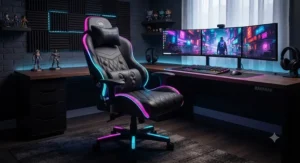
Muscle Relaxation on Demand: Solving Common Desk-Bound Aches
Long gaming and work sessions create a predictable set of muscle relaxation problems, and each has a specific, practical fix worth knowing rather than just enduring.
Problem: Lower back tightness after two-plus hours seated. Solution: a vibration lumbar pillow set to its lower intensity, run in 15–20 minute intervals rather than continuously, paired with standing every 40–50 minutes — a rhythm supported by Canadian occupational health guidance on prolonged sitting.
Problem: Shoulder and neck tension from leaning toward the monitor. Solution: this isn’t something a lumbar massage pillow addresses at all — it’s a monitor-height and seat-depth issue. No massage gaming chair fixes forward head posture; adjust your screen to eye level first.
Problem: Numbness in the legs during long sessions. Solution: check seat depth — if the front edge is pressing into the back of your knees, the seat is too deep for your leg length, regardless of how good the massage feature is. Some chairs, including the Dowinx Cat Ear Gaming Chair, offer adjustable seat sliders that help here.
Problem: General muscle relaxation that fades within an hour of turning the massage off. Solution: this is expected behaviour, not a defect — vibration massage provides temporary relief, not lasting structural change. Pair it with the stretch breaks mentioned above for effects that actually hold.
Massage gaming chairs solve real, specific problems well; they’re not a cure-all for every kind of desk-bound discomfort, and knowing the difference saves you from expecting more than the technology can deliver.
Massage Gaming Chairs for Home Office Comfort
Home office comfort is a slightly different problem than gaming comfort, even though the chairs overlap heavily. Work sessions tend to run longer and more continuously than gaming sessions, which are naturally broken up by loading screens, matchmaking, and match ends.
For home office use specifically, the massage lumbar function earns its keep differently than it does for gaming: instead of a reward between rounds, it becomes a tool for managing the low-grade tension that builds during back-to-back video calls or long stretches of focused work. Reviewers who use budget massage chairs primarily for work rather than gaming consistently mention using the vibration function during calls specifically, since it doesn’t interfere with typing or mouse use the way a full recline might.
The LiberNovo Omni stands out particularly for home office comfort because its OmniStretch massage was explicitly designed around desk-bound work patterns rather than gaming marathons — a five-minute stretch cycle fits naturally into the gap between meetings in a way that a constant vibration doesn’t always suit.
If your setup is genuinely split between remote work and gaming rather than gaming-first, weigh the chair’s all-day ergonomics — seat depth, armrest adjustability, lumbar positioning — more heavily than the massage feature itself, since you’ll spend far more cumulative hours sitting for work than for play.
Common Mistakes When Buying a Massage Gaming Chair
Buyers repeatedly make a handful of avoidable mistakes when shopping this category, and most come down to prioritizing the wrong spec first.
Mistake one: choosing based on massage intensity alone. As covered above, budget vibration motors are largely interchangeable in performance — obsessing over which pillow “vibrates hardest” wastes research time better spent on frame quality and weight rating.
Mistake two: ignoring the room’s climate. PU leather chairs bought for a home office in a warm, poorly ventilated room become genuinely uncomfortable by month two, regardless of how good the massage feature is.
Mistake three: skipping the weight rating check entirely. A chair rated near or below your actual body weight will show wear and instability far faster than one rated comfortably above it — this is one of the most common sources of post-purchase regret in aggregated reviews.
Mistake four: assuming all massage motors have the same warranty as the frame. As the LiberNovo Omni‘s two-year electronics warranty against a five-year frame warranty shows, the massage component is often the shorter-covered part of the chair — read the fine print rather than assuming blanket coverage.
Mistake five: buying premium features you won’t use. Heating and cooling, as found on the DXRacer Martian Pro Red Triangle, is genuinely valuable for some buyers and completely wasted on others — be honest about whether your space actually has the temperature swings that justify the added cost.
Long-Term Cost & Maintenance
Total cost of ownership on a massage gaming chair extends well past the sticker price, and it’s worth running the numbers before committing.
Budget chairs in the C$180–C$310 range typically carry one- to two-year warranties on the frame and often less on electronics, meaning a failed massage motor after year two is usually an out-of-pocket repair or replacement rather than a covered claim. Given that a standalone replacement vibration pillow generally costs a fraction of the chair itself, this isn’t a dealbreaker — but it’s a cost worth budgeting for if you plan to keep the chair long-term.
Premium chairs shift the math considerably. The LiberNovo Omni‘s five-year frame warranty means the core structure is protected well beyond the typical ownership window for a budget chair, even though its electronics coverage is shorter. Over a five-year period, a chair costing four to five times more but lasting proportionally longer — and requiring no mid-life replacement — can work out to a comparable or even lower cost-per-year than replacing two or three budget chairs in sequence.
The practical rule of thumb: if you’re gaming casually and might upgrade your whole setup in two to three years anyway, a budget massage chair’s shorter lifespan is a non-issue. If you’re setting up a space you expect to use for five-plus years, the premium tier’s longer frame warranty and more durable materials genuinely change the long-term value equation in their favour.
Safety, Certifications, and What to Check Before You Buy in Canada
Safety considerations for massage gaming chairs in Canada come down to a few practical checks rather than a complex regulatory maze.
Electrical safety marks: Any chair with a powered massage motor should carry a recognized electrical safety certification (CSA or an equivalent recognized mark) on the motor’s power adapter — check the product listing or manual before buying, since this isn’t always prominently advertised on off-brand budget models.
Frame certification: Look for BIFMA-tested frames, an industry standard referenced across multiple chairs in this list, which indicates the frame has passed independent stability and durability testing rather than relying solely on manufacturer claims.
Workplace ergonomics context: For anyone using the chair primarily for remote work, it’s worth knowing that the CSA Group’s Z412 standard on office ergonomics explicitly recommends alternating sitting postures throughout the day rather than relying on any single chair feature, massage included, to solve prolonged-sitting strain on its own.
Battery and charging safety: For chairs with rechargeable massage, heating, or cooling systems, avoid leaving the chair charging unattended overnight, and inspect the charging cable periodically for fraying — standard practice for any rechargeable device, but easy to overlook on furniture.
None of this should discourage a purchase; it’s simply the short checklist worth running through before you buy, the same way you’d check safety marks on any other electrical home product.
FAQ
❓ Do massage gaming chairs actually work?
❓ Are massage gaming chairs worth the extra cost?
❓ How long does the massage motor last on a gaming chair?
❓ Can I replace the massage pillow if it stops working?
❓ What's the difference between vibration massage and shiatsu massage in a chair?
Conclusion
A massage gaming chair isn’t going to replace a physiotherapist or undo a decade of desk-bound posture habits, but it genuinely does make long sessions more tolerable — and for anyone spending several hours a day seated, that’s not a small thing. The right choice really does come down to budget and how you’ll actually use it: the GTPLAYER Gaming Chair with Footrest and FANTASYLAB Gaming Chair with Massage Lumbar Support cover the budget end well for students and casual gamers, the GTRacing GT800A, Yaheetech Electric Massage Chair, and Dowinx Cat Ear Gaming Chair each bring a specific strength to the mid-range, and the LiberNovo Omni and DXRacer Martian Pro Red Triangle justify their premium pricing for anyone treating their chair as long-term infrastructure rather than a disposable purchase.
Whichever tier fits your situation, remember that the massage function works best as one part of a broader habit — regular breaks, posture changes, and a chair that actually fits your body — rather than a standalone fix. Check current pricing on Amazon.ca before you buy, since availability and promotions shift regularly, and prices may vary from what’s listed here at the time of research.
✨ Ready to Upgrade Your Setup?
🔍 Browse today’s massage gaming chair prices and pick the option that matches your budget and space. Your back will thank you after the first long session — check current availability now before your favourite colourway sells out!
Recommended for You
- 7 Best Gaming Chair With Speakers Picks for 2026 (Canada Guide)
- Reclining Gaming Chair for Napping: 7 Best Picks in Canada (2026)
- Reclining Gaming Chair: 7 Top Picks for Canadians in 2026
Disclaimer: This article contains affiliate links. As an Amazon Associate, I earn from qualifying purchases. If you purchase products through these links, we may earn a small commission at no additional cost to you.
✨ Found this helpful? Share it with your friends! 💬🤗
