
In This Article
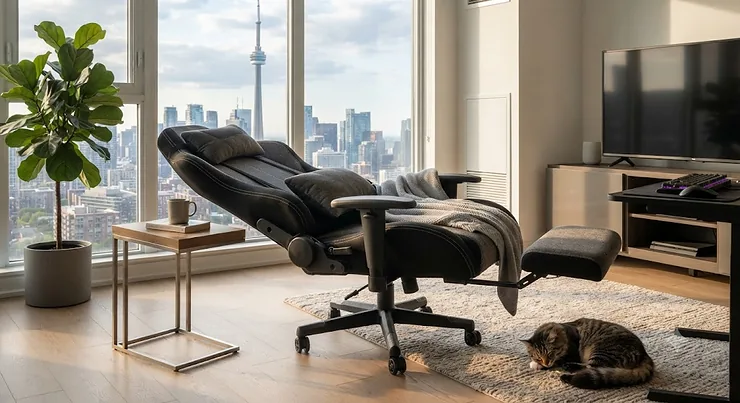
Somewhere between “I’ll just close my eyes for five minutes” and waking up with a keyboard imprint on your cheek lies the entire reason this article exists. A proper reclining gaming chair for napping isn’t a gimmick — it’s the piece of furniture that turns a hunched, guilty micro-doze into an actual, restorative break. If you’ve ever tried to nap in a standard office chair, you already know the problem: the backrest stops at maybe 110-120°, your neck has nowhere to go, and you wake up more tired than when you sat down.
We dug through real product listings, aggregated Canadian buyer feedback, and the current research on daytime rest to figure out which chairs actually deliver on the “nap-capable” promise versus which ones just slap the word “recline” on the box. Below you’ll find seven real, purchasable options — budget, mid-range, and premium — plus the science of why a 15-20 minute power nap in the right chair can genuinely change your afternoon. Whether you’re gaming late into the night or grinding through a home office schedule that never quite lets up, a reclining gaming chair for napping earns its keep the moment you stop reaching for a fourth coffee just to get through 3 p.m.
Quick Comparison Table
| Chair | Max Recline | Best For | Price Range (CAD) |
|---|---|---|---|
| Homall Gaming Chair with Footrest & Massage Lumbar | 160° | Budget all-rounder | Under C$220 |
| BestOffice Gaming Chair with Footrest | 155° | Sturdy budget frame | Under C$200 |
| Bossin Gaming Chair with Rocking Function | 180° | Confirmed napping performance | C$250-C$350 range |
| Furmax Gaming Recliner | 180° | True flat-out recline | C$220-C$300 range |
| Dowinx Big and Tall Gaming Chair | 165° | Larger body types | C$300-C$400 range |
| Corsair TC100 Relaxed Ergonomic Leatherette | 150° | Office-friendly ergonomics | C$350-C$450 range |
| Secretlab TITAN Evo | 165° | Premium build & pillow system | Around C$600+ |
Looking at the spread above, the recline angle alone doesn’t tell the whole story — a chair that hits 180° but has thin padding will still leave you sore, while the Corsair TC100 stops at 150° but is engineered specifically for extended, ergonomic rest. If nap quality is your only priority, the Bossin and Furmax chairs both go fully flat, but buyers who split time between gaming, working, and napping tend to prefer the Secretlab TITAN Evo or Dowinx for their all-around support. Budget shoppers shouldn’t assume cheaper means worse for napping specifically — the Homall chair’s 160° recline is genuinely usable for a midday doze, it just lacks the plush foam density of the pricier options.
💬 Just one click — help others make better buying decisions too!😊
Top 7 Reclining Gaming Chairs for Napping: Expert Analysis
1. Homall Gaming Chair with Footrest & Massage Lumbar Support — best budget all-rounder
The Homall Gaming Chair with Footrest & Massage Lumbar Support is the chair most Canadian shoppers land on first, and for good reason: it’s cheap, it’s everywhere, and it actually reclines far enough to matter. The backrest angle runs from 90° to 160°, adjusted by a lever on the lower right of the base, and the seat height range sits around 36-44 cm — tall enough for most home office desks. Steel frame construction with high-density sponge padding keeps the price down without feeling flimsy for day-to-day use.
Based on the spec comparison against similarly priced chairs, what stands out here is the USB-powered massage lumbar pillow — a small feature, but one that genuinely helps you settle into a 15-20 minute nap without your lower back complaining halfway through. Reviewers consistently note that the PU leather runs warm in summer, which is a fair trade-off given the price point, and that assembly takes roughly 20-30 minutes with the included tools. Aggregated Canadian buyer sentiment points to strong satisfaction for casual gamers and remote workers who want a “good enough” napping option without spending big.
Pros:
- ✅ 160° recline handles a proper afternoon nap
- ✅ USB massage lumbar pillow adds real lower-back relief
- ✅ Comes in six colourways to match any setup
Cons:
- ❌ PU leather breathes poorly in warm rooms
- ❌ Padding softens noticeably after a year of daily use
At a price generally landing under C$220, the Homall Gaming Chair with Footrest & Massage Lumbar Support offers strong value for anyone testing whether a reclining gaming chair for napping actually fits their routine before committing to a pricier model.
2. BestOffice Gaming Chair with Footrest — sturdiest budget frame
The BestOffice Gaming Chair with Footrest leans on brute simplicity: a metal base rated to handle roughly 1,130 kg (2,500 lb) of static load, paired with a deep recline that stretches up to 155°. That weight rating isn’t really about how heavy you are — it’s a signal of overall build quality, and it shows up in how little the chair wobbles when you shift positions mid-nap.
What most buyers overlook about this model is that the footrest and recline work together more smoothly than you’d expect at this price — you don’t need to fight the mechanism to get flat. The trade-off is a fairly basic lumbar setup compared with chairs that add powered massage pillows. Aggregated review sentiment from Canadian and U.S. buyers describes the chair as “surprisingly solid” for the cost, with the most common complaint being that the armrests aren’t height-adjustable, which matters more for desk work than for napping. For anyone who just wants a dependable, no-frills recline without paying for extras, this is a sensible entry point.
Pros:
- ✅ Reinforced metal base rated for heavy-duty use
- ✅ Smooth recline mechanism up to 155°
- ✅ Retractable footrest extends easily for full-leg support
Cons:
- ❌ Armrests are fixed, not height-adjustable
- ❌ No powered lumbar or massage feature
Priced generally under C$200, the BestOffice Gaming Chair with Footrest is a solid pick if structural durability matters more to you than plush extras.
3. Bossin Gaming Chair with Rocking Function — best confirmed napping performance
If there’s one chair on this list built specifically around the idea of the reclining gaming chair for napping, it’s the Bossin Gaming Chair with Rocking Function. The recline range runs a full 90° to 180°, and at maximum recline with the footrest extended, you’re essentially lying flat — not “leaning way back,” actually flat. Bossin adds a 20° controllable rocking function on top, an alloy-reinforced frame, and roughly 15 cm (6 inches) of high-density foam in the seat and backrest.
Here’s what the spec sheet won’t tell you outright, but aggregated Canadian buyer feedback does: several reviewers specifically mention using this chair for genuine midday naps during remote workdays, which is a rare and useful data point for a product category full of vague “great for relaxing!” marketing copy. The massage lumbar pillow is vibration-based rather than the pressure-kneading style you’d get in a premium recliner, which is standard at this price tier but worth knowing going in. Assembly takes most buyers 30-45 minutes, and the racing-style caster wheels roll smoothly across hardwood and carpet.
Pros:
- ✅ 180° recline plus 20° rocking for genuine full-flat naps
- ✅ Alloy frame with padded side wings for lateral support
- ✅ Napping-specific use confirmed by real Canadian reviewers
Cons:
- ❌ Needs significant clearance behind it at full recline
- ❌ Massage function is vibration-only, not pressure-based
Landing in the C$250-C$350 range, the Bossin Gaming Chair with Rocking Function is the single best-evidenced option here if napping — not just gaming — is your primary use case.
4. Furmax Gaming Recliner — true 180° flat recline
The Furmax Gaming Recliner takes a slightly different approach than most “gaming chairs” — it borrows more heavily from traditional recliner design while keeping the racing-style silhouette. It supports users up to roughly 118 kg (260 lb) and reclines the full 180°, with a solid, well-padded footrest that doesn’t flex or wobble under weight.
Based on the spec comparison with lighter-duty chairs on this list, the Furmax’s advantage is structural: the frame and footrest are built more like furniture than like a desk accessory, which translates into a steadier nap surface once you’re fully reclined. Reviewers describe the reclining action as smooth and easy to control, and — a genuinely useful detail for anyone who dreads flat-pack furniture — most report finishing assembly in around 10 minutes. What the spec sheet undersells is upholstery breathability; like most PU leather chairs in this price bracket, it isn’t ideal for hot rooms during long naps in summer.
Pros:
- ✅ Full 180° recline for a genuinely flat sleeping position
- ✅ Sturdy, well-padded footrest that doesn’t flex under weight
- ✅ Reportedly one of the quickest chairs on this list to assemble
Cons:
- ❌ PU leather retains heat during longer naps
- ❌ Weight capacity lower than some competitors on this list
At a price generally in the C$220-C$300 range, the Furmax Gaming Recliner is a strong pick for anyone who wants recliner-grade flatness without recliner-sized furniture.
5. Dowinx Big and Tall Gaming Chair — best for larger body types
The Dowinx Big and Tall Gaming Chair is built for Canadians who need more room and a higher weight rating — up to roughly 158 kg (348 lb) — without sacrificing recline range. The backrest tilts to 165°, and the linkage armrest design moves with your arm as you recline, which is a genuinely thoughtful touch most budget chairs skip entirely.
What most buyers overlook here is the retractable footrest working in tandem with the deep recline: you can stretch out fully rather than curling your legs up, which matters a lot for anyone over roughly 183 cm (6 feet) tall trying to nap comfortably. Reviewers consistently highlight the USB-powered massaging lumbar pillow as a standout feature — it’s a proper kneading motion rather than simple vibration, a step up from most chairs in this price tier. On paper, this means the Dowinx trades a bit of maximum recline angle (165° versus 180° on the Bossin and Furmax) for noticeably wider, heavier-duty construction that holds up better for bigger users.
Pros:
- ✅ Weight capacity up to 158 kg suits larger users
- ✅ Linkage armrests move naturally with recline
- ✅ Kneading-style massage lumbar pillow, not just vibration
Cons:
- ❌ Recline tops out at 165° rather than a full flat 180°
- ❌ Wider footprint needs more floor space than standard chairs
Generally priced in the C$300-C$400 range, the Dowinx Big and Tall Gaming Chair earns its spot for anyone whose frame simply doesn’t fit comfortably in a standard-size chair.
6. Corsair TC100 Relaxed Ergonomic Leatherette Gaming Chair — best office-friendly ergonomics
The Corsair TC100 Relaxed Ergonomic Leatherette Gaming Chair deliberately dials back the “racing seat” aesthetic in favour of something closer to a high-end task chair with gaming-chair recline. It tops out at 150° — the shallowest max recline on this list — but that number undersells how the chair actually feels, because Corsair prioritized seat depth, back-wing shaping, and a genuinely supportive lumbar setup over raw angle.
Here’s what the spec sheet won’t tell you, but reviewers note repeatedly: for people who split their day between focused work and quick naps, a chair that’s equally comfortable upright often gets used far more consistently than one that only shines at full recline. The removable lumbar and neck pillows let you fine-tune support for napping specifically, and the wider seat and back accommodate more body types than the narrower racing-style chairs on this list. Based on the spec comparison, this is less about maximum flatness and more about all-day usability with a genuinely restful recline mode built in.
Pros:
- ✅ Removable lumbar and neck pillows tailor support for napping
- ✅ Wide seat and back suit a broader range of body types
- ✅ Comfortable enough upright to double as your main work chair
Cons:
- ❌ 150° max recline is the shallowest on this list
- ❌ Premium ergonomic materials push the price higher than budget options
Typically priced in the C$350-C$450 range, the Corsair TC100 Relaxed Ergonomic Leatherette Gaming Chair suits buyers who want one chair that handles both a workday and a nap equally well.
7. Secretlab TITAN Evo — premium build and pillow system
The Secretlab TITAN Evo sits at the top of this list, and the price reflects it. Recline goes up to 165°, backed by cold-cure foam that’s denser and more consistent than the standard foam used in budget chairs, plus a 4-way L-ADAPT lumbar system that adjusts both height and depth rather than relying on a single lumbar pillow. The magnetic memory foam head pillow — Secretlab’s signature feature — attaches without straps and is specifically shaped to support the neck during recline.
Based on the spec comparison, this is the chair that most directly targets the napping use case among premium options: the head pillow alone solves the single biggest complaint reviewers raise about cheaper chairs, which is neck strain during longer reclines. What most buyers overlook is that Secretlab’s build quality shows up less in the recline angle itself (165° isn’t the highest on this list) and more in how consistently supportive the chair stays after months of daily use — cold-cure foam resists the “going soft” problem that plagues budget PU leather chairs within a year. Aggregated reviewer sentiment consistently praises the pillow system specifically for napping and lounging, not just gaming.
Pros:
- ✅ Magnetic memory foam head pillow purpose-built for neck support
- ✅ Cold-cure foam resists sagging far longer than budget padding
- ✅ 4-way L-ADAPT lumbar system adjusts to your exact spine curve
Cons:
- ❌ Highest price point on this list by a wide margin
- ❌ 165° recline, not the flattest option here despite the price
Generally priced around C$600 and up, the Secretlab TITAN Evo is the pick for buyers who see a reclining gaming chair for napping as a long-term furniture investment rather than a budget add-on.
Setting Up Your Chair for Better Naps: A Practical Usage Guide
Buying the right chair is half the equation — how you set it up determines whether you actually nap well in it. First, position the chair somewhere with enough clearance behind it; both the Bossin Gaming Chair with Rocking Function and the Furmax Gaming Recliner need roughly 60-90 cm of open space behind the backrest at full 180° recline, and skipping this measurement is the single most common setup mistake in the first 30 days of ownership.
Second, adjust the lumbar support before you adjust the recline angle, not after — most people do this backwards and end up compensating for poor lower-back positioning by reclining further than they actually need to. Third, if your chair has a headrest or head pillow like the Secretlab TITAN Evo, reposition it every time you switch between upright work and reclined napping; leaving it in one fixed spot defeats the purpose. For maintenance, wipe PU leather chairs weekly with a damp microfibre cloth to prevent the material from drying out and cracking prematurely, and re-tighten the base bolts every few months, since the repeated recline-and-return motion gradually loosens hardware on any gas-lift chair. Finally, resist the urge to leave the chair reclined flat when not in use — cycling it back to upright between naps reduces long-term wear on the recline mechanism.
Who Actually Naps in a Gaming Chair? Real-World Scenarios
Picture three different people, all shopping for the same thing but for different reasons. First, there’s the remote software developer who works split shifts to overlap with a European team — she needs a 15-20 minute reset around 2 p.m. without leaving her home office, and a chair like the Homall Gaming Chair with Footrest & Massage Lumbar Support gives her enough recline to actually rest without the commitment (or cost) of a separate piece of furniture.
Second, consider the university student in a shared apartment where a couch just isn’t an option — for him, a chair that pulls double duty as both a gaming seat and a nap-capable recliner, like the Furmax Gaming Recliner, solves a genuine space problem on a tight budget. Third, there’s the shift worker who games competitively in the evening and needs recovery naps between long work stretches; for this profile, the durability and neck support of something like the Secretlab TITAN Evo pays for itself over years of near-daily use, where a cheaper chair might need replacing within 18-24 months. Matching the chair to the actual pattern of use — occasional versus daily, tight budget versus long-term investment — matters more than chasing the single highest recline number on a spec sheet.
What Is a Reclining Gaming Chair for Napping?
A reclining gaming chair for napping is a gaming-style chair engineered with a deep recline range — typically 150° to 180° — combined with a footrest, lumbar support, and often a head pillow, specifically so it can double as a place to sleep for short periods during the day, not just sit upright while gaming or working.
How to Choose a Reclining Gaming Chair for Napping
- Check the maximum recline angle first. Anything under 150° will leave you semi-upright, which works for lounging but not for genuine napping — look for 165° or, ideally, a full 180° flat position.
- Prioritize the footrest quality, not just its presence. A retractable footrest that flexes or feels flimsy under leg weight undermines the whole point of a flat recline.
- Weigh foam density over marketing terms like “premium.” High-density or cold-cure foam holds its shape for years; cheaper sponge foam compresses and softens within 12-18 months of regular naps.
- Match the weight and size rating to your actual body. A chair rated for 113 kg that you’re pushing to its limit will feel unstable exactly when you’re most relaxed and least able to correct your position.
- Consider lumbar and neck support separately. A great recline angle with no real neck support just trades one discomfort for another once you’re actually asleep.
- Factor in clearance space, not just chair dimensions. A 180°-recline chair needs real floor space behind it — measure before you buy, not after delivery.
- Decide whether it needs to double as a work chair. If you’re sitting in it eight hours a day and napping in it for 20 minutes, upright ergonomics (like the Corsair TC100) matter as much as the recline itself.

Fully Reclining Gaming Chair vs Office Chair
This comparison comes up constantly, and the honest answer is: they’re built for genuinely different jobs. A standard office chair, even a well-reviewed ergonomic one, is engineered around the CSA Z412 standard’s guidance for supporting a working posture — spine alignment, monitor height, keyboard positioning — and most stop reclining somewhere between 90° and 120°, deliberately, because leaning further back while typing isn’t the goal. A fully reclining gaming chair for napping, by contrast, is engineered around the opposite priority: getting the spine into a flat or near-flat position where the muscles supporting your upper body can fully relax.
The practical difference shows up the moment you try to nap in each. In a typical office chair, your head has nowhere to rest once you lean back past 30-40°, so your neck muscles stay engaged even while you’re trying to sleep — which is exactly why so many “desk naps” leave people with a stiff neck instead of feeling rested. A chair like the Dowinx Big and Tall Gaming Chair or Secretlab TITAN Evo, on the other hand, is designed so the headrest or pillow catches your head at the angle it naturally falls to once your neck muscles relax. That said, office chairs still win on pure task-focused ergonomics for eight-hour workdays — the Canadian Centre for Occupational Health and Safety notes that no single sitting posture remains comfortable over an extended period, which is really the argument for owning a chair that can do both: upright for focused work, and reclined for the nap in between.
Power Napping: Why the Recline Angle Actually Matters
Power napping isn’t just a trendy phrase for “having a snooze at your desk” — it’s a specific, well-researched category of rest, typically defined as 10-20 minutes of daytime sleep designed to boost alertness without triggering sleep inertia, the groggy, disoriented feeling that comes from waking mid-deep-sleep. NASA’s well-known cockpit study found pilots who napped for around 26 minutes showed measurable gains in alertness and job performance compared to non-nappers, and shorter naps in the 10-20 minute range consistently show similar boosts to mood, short-term memory, and reaction time in follow-up research.
Here’s where the chair actually matters: sleep researchers generally agree the position you’re in during a power nap directly affects how quickly you fall asleep and how easily you wake up refreshed rather than groggy. Sitting bolt upright makes it hard to relax enough to nap efficiently, while lying fully flat on a bed risks sliding into deeper sleep stages you don’t want during a short daytime break. A reclining gaming chair set to somewhere between 140° and 165° hits a practical middle ground — relaxed enough to actually fall asleep quickly, but not so flat that you’re likely to oversleep into the grogginess zone. CBC News reported that Canadian sleep researchers, including neurologists at Toronto’s Sunnybrook Hospital, have found that daytime rest can meaningfully improve cognitive function and even long-term cardiovascular health when practiced in moderation — moderation being the operative word, since research on longer or more frequent naps shows a more mixed picture. The takeaway for chair shopping: you’re not just buying comfort, you’re buying the physical setup that determines whether a 15-minute break actually works.
Home Office Breaks: Building Napping Into Your Workday
Home office breaks have quietly become one of the more contested topics in remote work culture — some people treat a midday nap as a productivity hack, others still feel a flicker of guilt about it, holdover from decades of “napping is lazy” workplace norms. The research doesn’t really support the guilt. Structured breaks, including brief rest periods away from a screen, are a core part of standard workplace ergonomics guidance, and prolonged uninterrupted sitting is consistently flagged as the actual problem, not the occasional nap.
Practically, the easiest way to build a nap into home office breaks without derailing your schedule is to treat it like any other calendar block: 15-20 minutes, timer set, chair pre-adjusted to your preferred recline angle so you’re not fumbling with levers when you’re already tired. CCOHS guidance on prolonged sitting recommends short activity breaks roughly every 40 to 50 minutes to protect against the negative effects of staying in one position too long, and a chair that transitions smoothly between an upright working posture and a reclined resting posture — rather than requiring you to physically relocate to a couch or bed — removes most of the friction that stops people from actually taking that break. The chairs on this list that handle both roles best, like the Corsair TC100 and Secretlab TITAN Evo, tend to see the most consistent daily use precisely because switching modes takes seconds, not a walk to another room.
Common Mistakes When Buying a Reclining Gaming Chair for Napping
The most common mistake is buying based on recline angle alone, ignoring foam density and frame quality — a chair that hits 180° but uses thin, cheap padding will still leave you sore after a 20-minute nap, angle notwithstanding. A close second is skipping the clearance measurement behind the chair, which leads to buyers discovering, only after assembly, that a full recline slams into a wall or desk.
Another frequent misstep is assuming every “gaming chair” ships with a real footrest — some budget listings show a footrest in product photos that’s actually a separate add-on or missing entirely, so it’s worth double-checking the exact model’s included components before ordering. Buyers also regularly underestimate weight and size ratings, particularly with narrower racing-style chairs that look sturdy in photos but list capacities well under 113 kg. Finally, plenty of shoppers overlook upholstery breathability entirely, then discover mid-summer that PU leather traps heat uncomfortably during longer naps — a mesh-backed or fabric option like the Corsair TC100 solves this specifically if you tend to run warm.
Features That Actually Matter (And Those That Don’t)
Recline angle, footrest quality, and lumbar support genuinely matter — they’re the three features that most directly determine whether a chair delivers on the “napping” promise. Foam density matters more than most buyers realize going in; it’s the single biggest predictor of whether a chair still feels supportive after a year of regular use, versus going soft and flat.
RGB lighting, by contrast, looks great in product photos and does absolutely nothing for nap quality — it’s a pure aesthetic add-on that inflates price without functional benefit. Similarly, an extremely high weight-capacity rating well beyond your actual body weight doesn’t add extra comfort; past a certain point it’s mostly a marketing number. Wheel type matters more than people expect if you’re on hardwood floors — cheap plastic casters scratch and roll poorly, while PU-coated casters like those on the Bossin Gaming Chair with Rocking Function roll quietly and protect flooring. Where you should spend extra money, if the budget allows, is foam quality and the headrest/pillow system — not colour options or lighting.
Long-Term Cost & Maintenance
A C$200 chair and a C$600 chair rarely age the same way, and that gap matters more the longer you own the chair. Budget chairs using standard PU leather and lower-density foam typically show visible wear — cracking upholstery, flattened padding, a looser recline mechanism — somewhere in the 18-24 month range with near-daily use. Premium options built around cold-cure foam and higher-grade upholstery, like the Secretlab TITAN Evo, tend to hold their support and appearance for 3-5 years or longer under similar use, which changes the actual cost-per-year math even though the upfront price is higher.
Maintenance costs stay low across the board — occasional bolt tightening, wiping down upholstery, and replacing casters if you’re on hardwood — but the real long-term cost driver is how often you’re forced to replace the entire chair. If you nap in your chair daily and expect to keep using it for five-plus years, the value math tends to favour a mid-range or premium pick like the Dowinx Big and Tall Gaming Chair or Secretlab TITAN Evo over repeatedly replacing a budget chair every year or two. If your use is occasional — a few naps a week, mostly gaming otherwise — a budget option like the Homall Gaming Chair with Footrest & Massage Lumbar Support can reasonably last long enough to make sense financially.
Frequently Asked Questions
❓ Can you really nap comfortably in a gaming chair?
❓ What recline angle is best for napping in a gaming chair?
❓ Is a reclining gaming chair better than a recliner for home office napping?
❓ How much does a good reclining gaming chair for napping cost in Canada?
❓ Do reclining gaming chairs work well for tall or plus-size people?
Conclusion
A genuinely good reclining gaming chair for napping isn’t about chasing the single highest recline number — it’s about matching recline range, foam quality, and support features to how you’ll actually use the chair day to day. Budget picks like the Homall Gaming Chair with Footrest & Massage Lumbar Support and BestOffice Gaming Chair with Footrest prove you don’t need a huge spend to get a usable midday nap. The Bossin Gaming Chair with Rocking Function and Furmax Gaming Recliner deliver the flattest, most nap-dedicated positions on this list, while the Dowinx Big and Tall Gaming Chair solves the very real problem of finding a chair that fits a larger frame comfortably.
At the higher end, the Corsair TC100 Relaxed Ergonomic Leatherette Gaming Chair earns its keep as a chair that’s equally good for eight hours of focused work and a 20-minute recovery nap, and the Secretlab TITAN Evo is the pick for anyone treating this as long-term furniture rather than a quick fix. Whichever one you land on, the underlying science backs up the purchase: short, well-positioned daytime naps genuinely improve alertness and mood, and the right chair is what makes taking that break easy enough to actually do it regularly.
✨ Ready to reclaim your afternoons? Compare the picks above, check current prices, and pick the chair that matches your budget and your body — your next power nap is one click away! 😴
Recommended for You
- Reclining Gaming Chair: 7 Top Picks for Canadians in 2026
- Heated gaming chair for cold home offices: 7 Picks That Actually Warm You (2026)
- Gaming Chair With Lumbar Massage for Back Pain: 7 Top Picks (2026)
Disclaimer: This article contains affiliate links. As an Amazon Associate, I earn from qualifying purchases. If you purchase products through these links, we may earn a small commission at no additional cost to you.
✨ Found this helpful? Share it with your friends! 💬🤗
